Kubernetes for beginners. Part 39: Running workloads, storage and observability on Windows
All parts of the series “Kubernetes for beginners”In the previous part we built a hybrid test cluster: the k8s-lab-master-1 control plane, the Linux workers k8s-lab-node-1 and k8s-lab-node-2, and the Windows worker k8s-lab-win-1. On the Windows node kubelet and containerd run as Windows services, Calico in VXLAN mode and kube-proxy in winkernel mode run in HostProcess pods, the node is closed with the os=windows:NoSchedule taint, and Windows pods reach it through the windows-2025 RuntimeClass. We checked it with a ready-made Microsoft sample — the aspnetapp web application on Nano Server — and its two pods are still running. Today the node gets workloads of its own and everything you cannot operate them without: we build hello for Windows and release one multi-platform tag for both OSes, look at what requests and limits, probes and pod shutdown mean on Windows, install csi-driver-smb into the test cluster and attach SMB volumes, bring up Loki and kube-prometheus-stack in it, collect the Windows node's logs and metrics, and describe how to update a Windows node every month and when moving to a new Windows Server version.
The kubectl and helm commands in this part go to the test cluster: in the kubeconfig it is selected by the lab context from part 38, and installation commands name the context explicitly. This part does not touch the main cluster: everything observability needs is installed into the test one.
Windows images: nanoserver, servercore, server
A Linux image can have an almost empty base: distroless/static from part 5 weighs a couple of megabytes, since a static binary needs only the kernel. Windows programs talk to the system through user-mode libraries (kernel32.dll, ntdll.dll), and some of the services they need also run in user mode, so the base image contains the user-mode part of Windows, and system processes run in the container next to the application. Microsoft publishes three base images in the mcr.microsoft.com registry:
| Image | What is inside | Compressed size |
|---|---|---|
windows/nanoserver |
minimal Windows: cmd.exe, curl.exe, tar.exe, no PowerShell, no .NET Framework, no MSI installer |
about 200 MB |
windows/servercore |
Windows Server without the graphical shell: PowerShell, .NET Framework, WMI, roles such as IIS | a gigabyte or more |
windows/server |
the full Windows Server API set, including graphics libraries — for programs servercore is not enough for | several gigabytes |
The choice is simple: an application built into a single executable without .NET Framework dependencies — Go, Rust, modern .NET published self-contained — goes on nanoserver. Anything that needs PowerShell at startup, .NET Framework 4.x, IIS or an MSI install goes on servercore. server is rarely needed.
Two more differences from Linux. The default user: ContainerUser without administrator rights in nanoserver, ContainerAdministrator in servercore. Both exist only inside the container; the node has no such accounts. Tags are tied to the Windows version: ltsc2022 is build 20348, ltsc2025 is build 26100; base images have no latest tag. Why the image version matters is covered in part 36: with process isolation the container runs on the node's kernel, and the user-mode part of Windows in the image has to be compatible with it.
Since 2023 the base layers of Windows images are ordinary OCI layers. They used to be "foreign" layers: the manifest held only a link to MCR, the registry did not store them, and nodes went to the internet for the base on every pull. Now docker push to ghcr.io sends all layers, and a Windows node needs only the registry the image lives in.
A multi-platform image and os.version
In part 5 we looked at the index — the image's table of contents listing manifests for different platforms. The platform in a manifest descriptor is not just os and architecture: it also has an os.version field, and for Windows that field is the key one.
 tag ghcr.io/example/hello:1.3
   │
   ▼
 Index (application/vnd.oci.image.index.v1+json)
   ├─ manifest   linux/amd64
   ├─ manifest   linux/arm64
   ├─ manifest   windows/amd64   os.version 10.0.26100.33674
   │               ├─ layer: nanoserver ltsc2025 (base)
   │               └─ layer: C:\app\hello.exe
   └─ attestation × 3   (platform unknown/unknown)

 k8s-lab-node-1, linux/amd64              → manifest linux/amd64
 k8s-lab-win-1,  windows/amd64, 10.0.26100 → manifest windows/amd64
A Windows version consists of four numbers: 10.0.26100.33674 is major, minor, build and revision (UBR, update build revision). The build changes only with a new OS version: 20348 is Windows Server 2022, 26100 is Windows Server 2025. The revision grows with every monthly update.
containerd on a Windows node picks the manifest like this (platform matching code): OS and architecture must match, then major, minor and build from os.version are compared, and the revision is not considered at all. On a Windows Server 2025 node an image with a build from 20348 to 26100 inclusive is considered suitable — this mirrors Microsoft's compatibility table, where Windows Server 2025 runs Windows Server 2022 images in process isolation too. If several variants fit, the one with the higher version wins. If the index has no os.version field, any Windows variant fits — and with an incompatible build the container fails at startup with The operating system of the container does not match the operating system of the host. That is why for Windows the os.version field in the index is mandatory in practice, if not by the specification.
A Windows Server 2022 node will not accept the 26100 variant: a newer image never runs on an older kernel. This limitation will come up in the section on updates.
Building hello for windows/amd64
The hello code does not change: it is the same version as after part 33, with log/slog, metrics and tracing. Go compiles it for Windows without a single edit, including SIGTERM handling — why that works is covered in the section on shutdown. Only the Dockerfile is new:
# syntax=docker/dockerfile:1

# --- build: always on the build machine's platform ---
FROM --platform=$BUILDPLATFORM golang:1.27 AS build
ARG TARGETOS TARGETARCH
ARG VERSION=dev
WORKDIR /src
COPY go.mod go.sum ./
RUN --mount=type=cache,target=/go/pkg/mod go mod download
COPY *.go ./
RUN --mount=type=cache,target=/go/pkg/mod \
    --mount=type=cache,target=/root/.cache/go-build \
    CGO_ENABLED=0 GOOS=$TARGETOS GOARCH=$TARGETARCH \
    go build -trimpath -ldflags="-s -w -X main.version=${VERSION}" -o /out/hello .

# --- final image for Linux ---
FROM gcr.io/distroless/static-debian13:nonroot AS final-linux
COPY --from=build /out/hello /hello
USER 65532:65532
ENTRYPOINT ["/hello"]

# --- final image for Windows ---
FROM mcr.microsoft.com/windows/nanoserver:ltsc2025 AS final-windows
COPY --from=build /out/hello /app/hello.exe
USER ContainerUser
ENTRYPOINT ["C:\\app\\hello.exe"]

# --- pick by target OS ---
FROM final-${TARGETOS}
ARG VERSION=dev
LABEL org.opencontainers.image.title="hello" \
      org.opencontainers.image.version="${VERSION}" \
      org.opencontainers.image.source="https://git.example.com/demo/hello"
EXPOSE 8080
- The
buildstage still runs on the build machine's platform, and Go cross-compiles the binary forGOOS=windows; the.exeextension is added when copying. FROM final-${TARGETOS}picks the final stage: BuildKit fills in the built-inTARGETOSargument for each platform separately and builds only the stages it needs.- There is no
RUNin the Windows stage — the main condition for building a Windows image on Linux. BuildKit executesCOPY,LABEL,USERandENTRYPOINTitself: it unpacks the base layers, writes a new layer in the Windows format and edits the config.RUN, on the other hand, starts a process inside the image, andcmd.execannot run on a Linux kernel; there is no QEMU-like emulator for Windows. ENTRYPOINTin exec form with a full path: the shell form would call a shell, and when building on Linux BuildKit would write/bin/sh -cinto the config. The exec form is a JSON array, so the backslash in the path is doubled:"C:\app\hello.exe"is no longer JSON (\ais an invalid escape sequence there), and Docker would silently read the line as the shell form.
The build uses the same command as in part 5, with a third platform. Below is the essence of the detailed output (--progress=plain):
$ docker buildx build --platform linux/amd64,linux/arm64,windows/amd64 \
    --build-arg VERSION=1.3 \
    -t ghcr.io/example/hello:1.3 --push .
#0 building with "multi" instance using docker-container driver
...
#10 [windows/amd64 final-windows 1/2] FROM mcr.microsoft.com/windows/nanoserver:ltsc2025@sha256:05d1a7fb562f998ed3bc23b21dbd95aa26b3dd10ae921e830449e2db657f6704
#25 [linux/amd64->windows/amd64 build 6/6] RUN --mount=type=cache,target=/go/pkg/mod     --mount=type=cache,target=/root/.cache/go-build     CGO_ENABLED=0 GOOS=windows GOARCH=amd64     go build -trimpath -ldflags="-s -w -X main.version=1.3" -o /out/hello .
#27 [windows/amd64 final-windows 2/2] COPY --from=build /out/hello /app/hello.exe
...
#28 pushing manifest for ghcr.io/example/hello:1.3@sha256:912dccf9f068f7210f3673cbf4e8f14dc66772a47ed59b3264746f46ffdd180c 3.4s done
The linux/amd64->windows/amd64 line is the cross-compilation of the Windows binary on Linux. Building three platforms took a minute and a half, most of it downloading the nanoserver base. The tag is new — 1.3 — although the code is the same as in 1.2: tags are immutable (part 5), and the tag now has a third platform.
Where os.version in the index comes from
BuildKit takes the os.version field from the base image's config: nanoserver:ltsc2025 records its version there, and BuildKit carries it into the Windows manifest descriptor in the index. It has done so since 2023 (PR #3619), and version 0.20 fixed a regression that lost the version (PR #5714). The result is checked in the raw index:
$ docker buildx imagetools inspect ghcr.io/example/hello:1.3 --raw | \
    jq -c '.manifests[] | .platform' | grep -v unknown
{"architecture":"amd64","os":"linux"}
{"architecture":"arm64","os":"linux"}
{"architecture":"amd64","os":"windows","os.version":"10.0.26100.33674"}
The version 10.0.26100.33674 is the base image's revision, and it is newer than on our node (26100.33438): only the build has to match. Older guides add the field by hand with docker manifest annotate --os-version; with a current BuildKit that is not needed.
The sizes of the variants in one tag differ thirtyfold: the Linux variant's application is a layer of about 6 MB on top of a couple of tiny distroless layers, the Windows variant is the same 6 MB layer on top of a 194 MB nanoserver base.
When you cannot do without RUN
An application on servercore often needs RUN: enable a Windows feature, run an installer, configure IIS with PowerShell. Such a build runs on a Windows machine: since version 0.13 BuildKit has buildkitd.exe for Windows with a containerd worker, which buildx reaches with the remote driver over a named pipe (the Windows inter-process communication mechanism, a file-like object such as \\.\pipe\buildkitd), but the BuildKit documentation still calls this support experimental. The path proven over the years is Docker Engine on Windows Server with the classic builder. The Windows and Linux variants are then joined into one tag without rebuilding:
$ docker buildx imagetools create -t ghcr.io/example/app:2.0 \
    ghcr.io/example/app:2.0-linux \
    ghcr.io/example/app:2.0-windows-ltsc2025
imagetools create carries each variant's platform, including os.version from its config, into the new index. The same way you build an index with two Windows variants when the cluster has nodes of two Windows Server versions.
ghcr.io has a public certificate, and the Windows node, like the Linux nodes, needs no trust configuration. A private registry with an internal CA, as in the "Your own registry" section of part 5, the Windows node would trust through the same hosts.toml in the config_path directory from C:\Program Files\containerd\config.toml. We repeat the ghcr-pull Secret and its binding to the default ServiceAccount in the win-demo namespace — as in the demo namespace in part 38.
hello-win in the cluster
The Windows variant runs as a separate hello-win Deployment with its own Service in the win-demo namespace. A shared Deployment for both OSes is not possible: the Linux variant's pod template contains securityContext fields that are forbidden on Windows (runAsUser, seccompProfile, capabilities), and the API server will not accept a pod with .spec.os.name: windows and any of them.
apiVersion: apps/v1
kind: Deployment
metadata:
  name: hello-win
  namespace: win-demo
  labels:
    app.kubernetes.io/name: hello-win
spec:
  replicas: 2
  selector:
    matchLabels:
      app.kubernetes.io/name: hello-win
  template:
    metadata:
      labels:
        app.kubernetes.io/name: hello-win
    spec:
      os:
        name: windows
      runtimeClassName: windows-2025
      terminationGracePeriodSeconds: 30
      securityContext:
        runAsNonRoot: true
        windowsOptions:
          runAsUserName: ContainerUser
      containers:
      - name: hello
        image: ghcr.io/example/hello:1.3
        ports:
        - name: http
          containerPort: 8080
        env:
        - name: OTEL_TRACES_SAMPLER   # the test cluster has no trace collector
          value: always_off
        resources:
          requests:
            cpu: 250m
            memory: 256Mi
          limits:
            cpu: 500m
            memory: 256Mi
        startupProbe:
          httpGet: { path: /healthz, port: http }
          periodSeconds: 2
          failureThreshold: 30
        readinessProbe:
          httpGet: { path: /readyz, port: http }
          periodSeconds: 5
        livenessProbe:
          httpGet: { path: /healthz, port: http }
          periodSeconds: 10
          timeoutSeconds: 3
        lifecycle:
          preStop:
            sleep:
              seconds: 5
---
apiVersion: v1
kind: Service
metadata:
  name: hello-win
  namespace: win-demo
spec:
  selector:
    app.kubernetes.io/name: hello-win
  ports:
  - name: http
    port: 80
    targetPort: http
- The
win-demonamespace is the same one as foraspnetappin part 38, at therestrictedlevel of Pod Security Admission (part 30).hello-winonnanoserverwithContainerUserpasses it without warnings. os.name: windowstells the API server and PSA that this is a Windows pod. For such pods PSA does not require Linux fields — a seccomp profile, dropped capabilities, no privilege escalation — that do not exist on Windows. ButrunAsNonRoot: trueis checked here too: kubelet on Windows refuses to start a container whose user isContainerAdministrator.runtimeClassName: windows-2025brings anodeSelectorwith the build label and the toleration for the node's taint — without them the pod would stayPending.startupProbe— on Windows a container takes noticeably longer to start than on Linux: HCS creates an isolated environment for it and starts system processes. The startup probe gives up to a minute without stretching thelivenessProbeintervals.OTEL_TRACES_SAMPLER: always_off—hellofrom part 33 sends traces to an OpenTelemetry Collector, which the test cluster does not have; without this variable an export error to127.0.0.1:4317would appear in the log every few seconds.
Linux and Windows pods see each other by service names, as in part 38 — by full names: short ones like hello.demo do not resolve from Windows pods (why — in part 37). The Linux variant of hello runs in the test cluster's demo namespace — the same pods on the Linux workers and the same hello Service as in part 38. We start the probe check pod, like check in part 38, in default, which has no Pod Security restrictions:
$ kubectl run probe --rm -i --restart=Never --image=busybox:1.37 -- wget -qO- http://hello-win.win-demo.svc.cluster.local
hello from hello-win-759c899954-tq5nc
pod "probe" deleted from default namespace
$ kubectl -n win-demo exec deploy/hello-win -- curl.exe -s http://hello.demo.svc.cluster.local
hello from hello-55fb8f8684-69mvv
$ kubectl -n win-demo exec deploy/hello-win -- curl.exe -s -m 5 http://hello.demo
command terminated with exit code 6
Resources on Windows
In part 10 requests and limits turned into cgroup v2 files. In part 36 we briefly saw that Windows is different; now in detail. Windows has no cgroups, and the container boundary is set by a job object — a Windows kernel object that groups processes and applies common rules to them: a memory limit, a CPU time limit, a process count. A process inside a job object and all its descendants stay in it forever, and when the job object is closed they all end at once. For each container HCS creates its own job object and runs the container's system processes and the application in it (Kubernetes documentation).
kubelet passes Windows parameters to containerd over CRI, and this is how they are computed (kubelet code):
| Manifest field | What the job object gets | For 250m/500m/256Mi on a 4-CPU node |
|---|---|---|
limits.cpu |
CpuMaximum — the share of the whole node's CPU time in ten-thousandths: 10 × millicores / number of CPUs |
10 × 500 / 4 = 1250, that is 12.5 % of the node |
no limits.cpu |
nothing — no limit | — |
requests.cpu |
nothing | — |
limits.memory |
MemoryLimitInBytes — the job object's committed memory limit |
268435456 |
requests.memory |
nothing | — |
The main difference from Linux is that requests do not reach the kernel at all. On Linux the CPU request becomes the cpu.weight weight; on Windows kubelet deliberately sets no weight — the code says the weight used to be set and kept the limits from working. Windows caps CPU time from above but does not guarantee a minimum. Requests remain a sum for the scheduler (part 13), and only limits protect from a "noisy neighbour". The CPU limit is a hard ceiling of the job object, and the effect is the same as CFS throttling in part 10: average load is low while individual requests wait.
Memory without an OOM killer
Here the difference is fundamental. Windows has no OOM killer — a kernel component that picks and kills a process when memory runs out. Memory on Windows is first committed: the system promises the process that the pages will exist and charges the promise against the commit limit — the sum of physical memory and the paging file. The paging file (pagefile.sys) is mandatory on Windows, and when physical memory runs short pages go there: the node slows down, but processes are not killed (Kubernetes documentation).
The job object's memory limit caps exactly the committed memory of all the container's processes together. When a process asks for more, the memory allocation function (VirtualAlloc) simply returns an error, and what happens next is up to the program. Let's check on hello-win with its 256 MiB limit. We take a small Go program, memhog.exe, that allocates memory in 16 MiB chunks and touches every page, copy it into a running pod — kubectl cp works with a Windows container too, nanoserver has tar.exe — and run it next to hello.exe, in the same job object:
$ kubectl cp memhog.exe win-demo/hello-win-8658cc7d9-gghk2:/Users/ContainerUser/memhog.exe
$ kubectl -n win-demo exec hello-win-8658cc7d9-gghk2 -- cmd /c "C:\Users\ContainerUser\memhog.exe"
allocated 16 MiB
allocated 32 MiB
...
allocated 128 MiB
runtime: VirtualAlloc of 16777216 bytes failed with errno=1455
fatal error: out of memory

runtime stack:
runtime.throw({0x7ff7bdeb8637?, 0xd8099ff800?})
...
^C
$ kubectl -n win-demo get pod hello-win-8658cc7d9-gghk2
NAME                        READY   STATUS    RESTARTS   AGE
hello-win-8658cc7d9-gghk2   1/1     Running   0          5m52s
Error 1455 is ERROR_COMMITMENT_LIMIT: the job object's commit limit is exhausted. memhog got only 128 MiB out of 256: the rest is already committed by hello.exe (about 95 MiB — Go reserves memory generously) and the container's system processes. The Go runtime answers such a failure by ending the process with fatal error: out of memory and exit code 2; .NET throws OutOfMemoryException, a C program can check the result and survive. After the stack trace the crashed memhog hung and the exec had to be interrupted, while the pod kept running as if nothing had happened: no restart, no OOMKilled. Had the main process run out of memory, Kubernetes would have seen an ordinary container crash with an exit code and reason: Error — not OOMKilled. The cause is then found in the previous run's log (kubectl logs --previous) and in the container's committed memory metric, discussed below. Hence:
- The memory limit needs headroom for the container's system: the job object also holds system processes, a few dozen megabytes for
nanoserver, and it counts committed memory, not the working set thatkubectl topshows. - Memory requests = limits: without limits pods can commit more than the node's physical memory, and the whole node goes into paging; the documentation directly recommends setting limits on all Windows pods.
- There is no eviction on memory pressure: kubelet on Windows does not evict pods when memory runs out and does not implement
--enforce-node-allocatable, and the QoS class shows in the status but affects nothing except scheduling order. TheevictionHardthreshold is still subtracted fromallocatable:k8s-lab-win-1has 500 MiB less memory for pods than the node itself.
Kubelet reservation and priority. systemReserved and kubeReserved on Windows only reduce allocatable; the documentation advises reserving at least 2 GiB of memory and running kubelet with --windows-priorityclass=ABOVE_NORMAL_PRIORITY_CLASS so that pods do not starve it of CPU time. kubeadm's kubelet-config ConfigMap is shared by all nodes, so such settings go onto the Windows node itself — into the service flags in C:\var\lib\kubelet\kubeadm-flags.env or into a patch in C:\k\patches, like maxPods in part 38. And finally: Windows pods do not support in-place resize (from part 10), even though the feature is enabled on the Windows node.
Probes and graceful shutdown
Probes: kubelet runs HTTP and TCP probes from the node side, as on Linux. Exec probes work too, but each one starts a new process in the container through HCS, which on Windows takes noticeably longer — give such a probe a larger timeoutSeconds and remember that nanoserver has no PowerShell, only cmd.exe.
Stopping a container. Windows has no POSIX signals. Instead it has console control events: the system calls a registered handler in the process with an event code — CTRL_C_EVENT, CTRL_CLOSE_EVENT, CTRL_SHUTDOWN_EVENT and others. When a container stops, runhcs — the containerd shim for Windows — asks HCS to shut the container down gracefully, the processes inside get CTRL_SHUTDOWN_EVENT, as when the computer shuts down, and once terminationGracePeriodSeconds expires the container is ended forcibly together with its job object. In servercore containers the wait used to be set by Windows itself — 5 seconds of the WaitToKillServiceTimeout registry value — but hcsshim fixed this in 2023 (PR #1416), and containerd 2.2.2 on k8s-lab-win-1 honours the pod's period for both base images.
Go turns CTRL_CLOSE_EVENT, CTRL_LOGOFF_EVENT and CTRL_SHUTDOWN_EVENT into syscall.SIGTERM for os/signal channels (package documentation). So signal.NotifyContext from part 5 works on Windows unchanged: hello.exe switches /readyz to 503, waits for in-flight requests and exits. The process has to exit on its own: the event handler only grants a delay, and after it returns the system ends the process. Let's delete a pod and watch its log:
$ kubectl -n win-demo logs -f hello-win-759c899954-tkfg6 &
$ date +%T.%N; kubectl -n win-demo delete pod hello-win-759c899954-tkfg6; date +%T.%N
13:07:29.630381395
pod "hello-win-759c899954-tkfg6" deleted from win-demo namespace
{"time":"2026-11-07T13:07:34.6630246+03:00","level":"INFO","msg":"signal received, shutting down"}
{"time":"2026-11-07T13:07:34.6646675+03:00","level":"INFO","msg":"bye"}
13:07:36.352513500
The signal arrived after 5 seconds — the length of preStop — and the process exited within two milliseconds. Deleting the pod took 6.7 seconds in total: for about another second and a half after the process exited HCS was stopping the container itself — its system processes and environment. This time depends on the node's disk: on the lab, while the VM disks were on an HDD, the same stop took 17 seconds, so for Windows pods terminationGracePeriodSeconds should be generous.
preStop. The race between removing the pod from the EndpointSlice and stopping the process is the same as on Linux. The sleep action in the preStop hook is executed by kubelet itself, so it needs neither sleep nor a shell in the image.
Node shutdown. The Windows graceful node shutdown feature lets kubelet, running as a Windows service, delay the OS shutdown by shutdownGracePeriod and stop the pods gracefully. In 1.37 it is beta and enabled by default — the kubelet metric kubernetes_feature_enabled{name="WindowsGracefulNodeShutdown",stage="BETA"} on our node is 1 — but it only takes effect if shutdownGracePeriod is non-zero, and by default it is 0s. Planned maintenance still starts with kubectl drain: only it respects PodDisruptionBudget.
Storage: CSI on Windows
In part 21 a CSI driver consisted of a controller and a node plugin — a DaemonSet that mounts the volume on the node when kubelet calls NodeStageVolume and NodePublishVolume. On Linux the node plugin needs a privileged container: mounting is an operation on the node's system. Windows has no privileged containers, and for a long time the job was done by csi-proxy.
 csi-proxy (old scheme)                        HostProcess (current scheme)
 ┌───────────────────────────────────┐         ┌───────────────────────────────────┐
 │ node plugin pod                   │         │ HostProcess node plugin pod       │
 │ ordinary Windows container,       │         │ processes right on the node,      │
 │ no rights on the node             │         │ NT AUTHORITY\SYSTEM               │
 │        │                          │         │        │                          │
 │        │ gRPC over named          │         │        │ Windows API calls        │
 │        ▼ pipes \\.\pipe\csi-…     │         │        │ and PowerShell directly  │
 │ csi-proxy.exe — Windows service   │         │        │                          │
 │        │                          │         │        │                          │
 │        ▼                          │         │        ▼                          │
 │ disks, volumes, SMB mappings      │         │ disks, volumes, SMB mappings      │
 └───────────────────────────────────┘         └───────────────────────────────────┘
csi-proxy is a program installed on every Windows node as a service. It exposes a set of APIs for storage operations — disks, volumes, file system, SMB, iSCSI — over gRPC (a remote procedure call framework on top of HTTP/2 with methods described in Protocol Buffers) through named pipes. The node plugin in an ordinary container gets these pipes as volumes and asks csi-proxy to do what it has no rights to do itself. The downsides: one more service on every node, and only the operations the csi-proxy API foresees.
HostProcess containers from part 36 made the intermediary optional: the node plugin itself runs as a node process, and the csi-proxy code becomes a Go library that drivers embed into the plugin (csi-proxy repository). Drivers that have not moved to HostProcess still need csi-proxy — it can also be installed as a HostProcess DaemonSet.
csi-driver-smb on the Windows node
csi-driver-smb from part 24 supports Windows nodes. In the main cluster we installed it from the release's four Linux manifests, and no Windows DaemonSet is needed there. Into the test cluster we install the same v1.20.4 release with the Helm chart (part 27): by default it has windows.enabled: true and windows.useHostProcessContainers: true (chart parameters) — a Windows DaemonSet on HostProcess containers, without csi-proxy.
First, the same environment as in part 24: the storage-credentials namespace with the smb-files-k8s Secret (the svc-k8s-smb account) and the smb StorageClass for the //files.example.com/k8s share — the same manifests, only in the lab context. There is one difference — the toleration for the Windows DaemonSet. The default is meant for a taint with the node.kubernetes.io/os key, while ours has the os key, and with the defaults the DaemonSet would get no pods. We set our own:
# smb-windows-values.yaml
windows:
  tolerations:
  - key: os
    operator: Equal
    value: windows
    effect: NoSchedule
$ helm repo add csi-driver-smb https://raw.githubusercontent.com/kubernetes-csi/csi-driver-smb/master/charts
$ helm --kube-context lab install csi-driver-smb csi-driver-smb/csi-driver-smb -n kube-system --version 1.20.4 \
    -f smb-windows-values.yaml
$ kubectl --context lab -n kube-system get ds -l app.kubernetes.io/instance=csi-driver-smb
NAME               DESIRED   CURRENT   READY   UP-TO-DATE   AVAILABLE   NODE SELECTOR              AGE
csi-smb-node       3         3         3       3            3           kubernetes.io/os=linux     5m28s
csi-smb-node-win   1         1         1       1            1           kubernetes.io/os=windows   5m28s
$ kubectl --context lab -n kube-system get pods -l app=csi-smb-node-win -o wide
NAME                     READY   STATUS    RESTARTS      AGE     IP              NODE
csi-smb-node-win-bwwmx   2/2     Running   0             27s     192.168.10.25   k8s-lab-win-1
As in part 24, the Linux DaemonSet also runs on the control plane, so it has three pods — on the master and both workers. The Windows pod has two containers: node-driver-registrar and smb (the smbplugin:v1.20.4-windows-hp image); there is no separate liveness-probe as on Linux. The pod's IP is the node's address: HostProcess pods always run in the node's network. On a slow disk node-driver-registrar may ask for the driver name before the driver starts answering (Error retreiving CSI driver name ... DeadlineExceeded) and restart once; on the second attempt everything registers. The driver's controller runs on a Linux node, and creating volume directories on the share is still its job.
The server: four more addresses
Samba on files.example.com from part 24 lets in only the main cluster's node addresses — in hosts allow and in the ufw rules. We add the test cluster's nodes: the Windows node 192.168.10.25 — the HostProcess plugin mounts volumes from it — and the Linux nodes 192.168.10.23, .24 and .26, where the driver's controller, which creates volume directories on the share, and the Linux plugin run:
user@files:~$ sudo grep 'hosts allow' /etc/samba/smb.conf
   hosts allow = 192.168.10.17 192.168.10.20 192.168.10.21 192.168.10.23 192.168.10.24 192.168.10.25 192.168.10.26 127.0.0.1
user@files:~$ sudo smbcontrol smbd reload-config
user@files:~$ for ip in 192.168.10.23 192.168.10.24 192.168.10.25 192.168.10.26; do
>   sudo ufw allow from $ip to any port 445 proto tcp comment 'SMB: k8s nodes'
> done
smbcontrol smbd reload-config re-reads the configuration without restarting smbd and without dropping the main cluster nodes' sessions. The share itself, the svc-k8s-smb account and its rights stay as in part 24. The Calico policy from parts 22 and 24 that forbids pods from going to the file servers directly lives in the main cluster; it is worth repeating in the test one, and it will not get in the Windows node's way: the HostProcess plugin mounts from the node's network, not from a pod.
A volume in a Windows pod
In the Windows pod itself the volume is attached as usual — a persistentVolumeClaim in volumes and a Windows path in mountPath. The writing pod runs on plain nanoserver and appends the current time to a file on the volume every 10 seconds:
apiVersion: v1
kind: PersistentVolumeClaim
metadata:
  name: reports
  namespace: win-demo
spec:
  accessModes: ["ReadWriteMany"]
  storageClassName: smb
  resources:
    requests:
      storage: 1Gi
---
apiVersion: apps/v1
kind: Deployment
metadata:
  name: reports-writer
  namespace: win-demo
spec:
  replicas: 1
  selector:
    matchLabels:
      app.kubernetes.io/name: reports-writer
  template:
    metadata:
      labels:
        app.kubernetes.io/name: reports-writer
    spec:
      os:
        name: windows
      runtimeClassName: windows-2025
      securityContext:
        runAsNonRoot: true
        windowsOptions:
          runAsUserName: ContainerUser
      containers:
      - name: writer
        image: mcr.microsoft.com/windows/nanoserver:ltsc2025
        command:
        - cmd
        - /v:on
        - /c
        - "for /l %i in (0,0,1) do (echo !date! !time! >> C:\\data\\visits.log & ping -n 11 127.0.0.1 >nul)"
        volumeMounts:
        - name: reports
          mountPath: C:\data
        resources:
          requests: { cpu: 50m, memory: 64Mi }
          limits: { cpu: 200m, memory: 128Mi }
      volumes:
      - name: reports
        persistentVolumeClaim:
          claimName: reports
for /l %i in (0,0,1) is an endless cmd.exe loop, and ping -n 11 to the loopback address is a 10-second pause: nanoserver has no timeout.exe. The /v:on switch enables delayed variable expansion: cmd substitutes %time% once, when it reads the whole loop line, and without it every line in the file would have the same time; !time! is expanded on every iteration.
$ kubectl apply -f reports.yaml
persistentvolumeclaim/reports created
deployment.apps/reports-writer created
$ kubectl -n win-demo get pvc reports
NAME      STATUS   VOLUME                                     CAPACITY   ACCESS MODES   STORAGECLASS   VOLUMEATTRIBUTESCLASS   AGE
reports   Bound    pvc-ea3d8e0f-a51d-4662-9e44-b9174787e9a2   1Gi        RWX            smb            <unset>                 5s
$ kubectl -n win-demo exec deploy/reports-writer -- cmd /c "type C:\data\visits.log"
Sat 11/07/2026 11:32:00.71
Sat 11/07/2026 11:32:10.82
Sat 11/07/2026 11:32:20.91
How an SMB volume is mounted on Windows
On Linux the node plugin called mount -t cifs. On Windows it uses SMB global mapping — the ability of the Windows SMB client to attach a share for the whole node rather than for a user session (Microsoft documentation). The plugin's log on the Windows node shows it step by step:
$ kubectl -n kube-system logs csi-smb-node-win-tmwv5 -c smb | grep -E 'NewSmbGlobalMapping|NodePublishVolume: mount'
I1107 12:50:41.289414    3084 smb.go:108] begin to run NewSmbGlobalMapping with \\files.example.com\k8s\win-demo-reports-pvc-ea3d8e0f-a51d-4662-9e44-b9174787e9a2, AZURE\svc-k8s-smb, requirePrivacy=true
I1107 12:50:42.264444    3084 nodeserver.go:133] NodePublishVolume: mount \var\lib\kubelet\plugins\kubernetes.io\csi\smb.csi.k8s.io\baecf4ef08a658e21cb8545a32bc8fa6d0e686b7609dd86a15c949060a26e442\globalmount at c:\var\lib\kubelet\pods\5530838f-65a3-41a2-a236-3c88c4634121\volumes\kubernetes.io~csi\pvc-ea3d8e0f-a51d-4662-9e44-b9174787e9a2\mount volumeID(files.example.com/k8s#win-demo-reports-pvc-ea3d8e0f-a51d-4662-9e44-b9174787e9a2#pvc-ea3d8e0f-a51d-4662-9e44-b9174787e9a2#archive) successfully
- NodeStage. The plugin calls
New-SmbGlobalMappingwith the path\\files.example.com\k8s\<volume directory>and the credentials from thesmb-files-k8sSecret; the-RequirePrivacyflag (the chart'swindows.requirePrivacyForGlobalMappingparameter, on by default) requires SMB3 encryption — the counterpart of thesealoption on Linux. Then a symbolic linkC:\var\lib\kubelet\plugins\kubernetes.io\csi\smb.csi.k8s.io\<hash>\globalmountpointing to the network path is created. The hash, as on Linux, is SHA-256 of thevolumeHandle. - NodePublish. Another link appears in the pod's volume directory — to
globalmount— and containerd attaches it into the container at themountPath. - NodeUnstage. The link is removed, and the mapping with it (
windows.removeSMBMappingDuringUnmount: truein the chart).
Note AZURE\svc-k8s-smb: the Windows plugin passes the account as DOMAIN\name and, if the Secret has no domain field, substitutes the AZURE domain — a legacy of a project that started with Azure Files. Samba as a standalone server ignores the domain in the credentials, so the volume mounted. A Windows server in a domain needs the real domain — the domain: EXAMPLE field in the Secret, as mentioned in part 24.
Differences from Linux worth knowing:
- The class's
mountOptionshave no effect. Of all mount parameters the Windows plugin takes only the account and password;vers,dir_mode,file_mode,uid,nobrl,nolease,hardare options of the Linux cifs module, the Windows client has none of them, and the plugin's mount log does not show them. OnesmbStorageClass works for both OSes: Linux nodes apply the options, Windows nodes skip them. - The server decides on permissions. Everything a process in the container does with the volume's files the server sees as actions of
svc-k8s-smb: Samba creates files as that user with the modes fromcreate maskanddirectory mask. There is no owner and file mode emulation as with cifs, andfsGroupis forbidden in a Windows pod. Access between applications has to be separated by different accounts and shares. - The mapping is visible to the whole node: according to the Microsoft documentation, any process on the node gets access to the share. An ordinary container sees only its own directory, while any HostProcess pod sees the whole volume directory on the server.
- Locks. The Windows client honours SMB mandatory byte-range locks, while Linux pods with
nobrlfrom part 24 keep locks only locally. If the same file is written by pods on Linux and on Windows, locks between them do not work.
NFS — Linux nodes only
csi-driver-nfs from part 23 has no Windows plugin. Windows Server has its own NFS client, but the driver does not use it, and the NFS server from part 22 is closed to everyone but the main cluster's Linux nodes. We do not install csi-driver-nfs into the test cluster, but the rule applies to any hybrid cluster that has it. If a Windows pod asks for an NFS volume, the scheduler will place it — it does not know which drivers are registered on a node — and kubelet will not be able to mount it. Let's check with a static PV for the nfs.csi.k8s.io driver and a CSIDriver object — the one the driver installation creates (attachRequired: false) — but without the driver itself, the way a Windows node sees it in a cluster where the driver runs only on Linux:
$ kubectl -n win-demo describe pod nfs-win-test | tail -1
  Warning  FailedMount  36s (x8 over 100s)  kubelet  MountVolume.MountDevice failed for volume "nfs-win-test" : kubernetes.io/csi: attacher.MountDevice failed to create newCsiDriverClient: driver name nfs.csi.k8s.io not found in the list of registered CSI drivers
The pod stays in ContainerCreating. Without the CSIDriver object the error would be different — timed out waiting for external-attacher of nfs.csi.k8s.io CSI driver: not knowing the driver, Kubernetes assumes the volume needs an attach step and waits for an attacher sidecar that does not exist. The rule for a hybrid cluster: SMB for Windows applications, NFS only for pods on Linux. Data both OSes need goes on an SMB share.
Logs: stdout, the event log, ETW and LogMonitor
For a container that writes to stdout and stderr nothing changes on Windows: containerd writes the streams to files in the CRI format from part 33, only the path is C:\var\log\pods\<namespace>_<pod>_<uid>\<container>\0.log, kubelet rotates them the same way, kubectl logs works the same way. hello.exe writes slog JSON lines to stdout, and its logs are no different from the Linux variant's.
The problem is that traditional Windows programs write almost nothing to stdout. Their logging channels are different:
- The Windows event log (Event Log) — a system service that accepts structured records from programs and services. Records are sorted into channels (
System,Application, separate component channels such asMicrosoft-Windows-Host-Network-Service-Admin), and each has a source, an event code (Event ID), a level (error, warning, information) and a time. It is read withGet-WinEventor Event Viewer. - ETW (Event Tracing for Windows) — a kernel-level tracing mechanism. Components called providers (there are hundreds: IIS, the .NET runtime, the network stack, HNS) declare events and write them only if someone is listening. A trace session enables the needed providers at a given verbosity and collects events into buffers, from which a consumer reads them — to a file or in real time. A disabled provider costs almost nothing, which is why ETW is built in everywhere.
- Files — IIS writes its request log to
C:\inetpub\logs\LogFilesin the W3C format, many applications write their own text logs.
containerd will see none of this. The bridge between them and stdout is LogMonitor, a Microsoft tool (repository) that runs inside the container: it starts the application as a child process, subscribes to the given event log channels and ETW providers, watches files and prints all of it to its own stdout, in JSON by default. The configuration lives in C:\LogMonitor\LogMonitorConfig.json. The typical example is IIS on servercore, the very heavy image that we do not run in this block:
{
  "LogConfig": {
    "logFormat": "json",
    "sources": [
      {
        "type": "EventLog",
        "startAtOldestRecord": true,
        "eventFormatMultiLine": false,
        "channels": [
          { "name": "system", "level": "Warning" },
          { "name": "application", "level": "Error" }
        ]
      },
      {
        "type": "File",
        "directory": "C:\\inetpub\\logs",
        "filter": "*.log",
        "includeSubdirectories": true
      }
    ]
  }
}
An ETW source is described the same way — as a list of providers with a name, GUID and level. The Dockerfile of an IIS image with LogMonitor:
FROM mcr.microsoft.com/windows/servercore/iis:windowsservercore-ltsc2025
COPY LogMonitor.exe LogMonitorConfig.json C:/LogMonitor/
COPY site/ C:/inetpub/wwwroot/
ENTRYPOINT ["C:\\LogMonitor\\LogMonitor.exe", "C:\\ServiceMonitor.exe", "w3svc"]
The startup chain: LogMonitor starts ServiceMonitor.exe from the IIS image, which starts the W3SVC service and watches it — the container lives as long as the service runs — and LogMonitor forwards the logs. LogMonitor.exe is taken from the repository's releases (the stable version at the time of writing is 2.2.1) and put into the build context after checking its checksum. This Dockerfile has no RUN either and can be built on Linux, like hello. A caveat: IIS writes the request log to a file with buffering, so lines appear in stdout with up to a minute's delay.
Loki and Alloy for the Windows node
In the main cluster logs are collected by the Loki from part 33. The test cluster gets its own: this way the block does not touch the main cluster, and namespaces and pods of the two clusters do not mix in the same queries. The Alloy DaemonSet from part 33 would not suit the Windows node: its image is Linux, and it cannot see the Windows node's files. The Windows node needs its own instance, and the most convenient one is a HostProcess pod: the Alloy process runs right on the node, reads C:\var\log\pods as ordinary files and can also read the node's own event log.
 k8s-lab-win-1
 ┌──────────────────────────────────────────────────────────────┐
 │ pod hello-win: hello.exe ───────────────────────────► stdout │
 │ pod with LogMonitor: event log, files ──────────────► stdout │
 │                                                          │   │
 │                       containerd ◄───────────────────────┘   │
 │                           │                                  │
 │                           ▼                                  │
 │ C:\var\log\pods\<ns>_<pod>_<uid>\<container>\0.log           │
 │                           │                                  │
 │                           ▼                                  │
 │ Alloy (HostProcess) ◄──── node event log: System             │
 └───────────────────────────┼──────────────────────────────────┘
                             │ HTTP: 192.168.10.24:31100 (NodePort)
                             ▼
 Linux nodes: kube-proxy ──► loki-gateway ──► Loki
Loki in the test cluster
First, the monitoring namespace at the privileged level of Pod Security Admission: both Alloy and windows-exporter below are HostProcess pods, and node-exporter mounts node directories and runs in its network.
$ kubectl --context lab create namespace monitoring
$ kubectl --context lab label namespace monitoring pod-security.kubernetes.io/enforce=privileged
Loki is installed with the same chart and in the same Monolithic mode as in part 33. The values are loki-values.yaml from there with these differences:
# loki-lab-values.yaml: loki-values.yaml from part 33, where
# - the pod's file system replaces S3: the test cluster has neither S3 nor local-path;
# - retention_period: 3d;
# - the gateway is published on a NodePort for the Windows node
loki:
  schemaConfig:
    configs:
    - from: "2026-10-01"
      store: tsdb
      object_store: filesystem
      schema: v13
      index:
        prefix: loki_index_
        period: 24h
  storage:
    type: filesystem
  limits_config:
    retention_period: 3d
    allow_structured_metadata: true
  compactor:
    retention_enabled: true
    delete_request_store: filesystem

singleBinary:
  replicas: 1
  persistence:
    enabled: false

gateway:
  service:
    type: NodePort
    nodePort: 31100
$ helm --kube-context lab install loki oci://ghcr.io/grafana-community/helm-charts/loki \
    --version 20.4.1 -n monitoring -f loki-lab-values.yaml
...
STATUS: deployed
$ kubectl --context lab -n monitoring get pods,svc -l app.kubernetes.io/instance=loki -o wide | grep -E 'NAME|loki-0|gateway'
NAME                               READY   STATUS    RESTARTS   AGE   IP              NODE
pod/loki-0                         2/2     Running   0          78s   172.21.211.27   k8s-lab-node-1
pod/loki-gateway-cd47c7dc8-k5fx8   2/2     Running   0          78s   172.21.172.13   k8s-lab-node-2
NAME                            TYPE        CLUSTER-IP       EXTERNAL-IP   PORT(S)                      AGE
service/loki-gateway            NodePort    10.106.213.144   <none>        80:31100/TCP                 79s
Loki's data lives in the pod's emptyDir and disappears when the pod is recreated — acceptable for a lab.
Why NodePort. A HostProcess pod lives in the node's network: the cluster DNS is invisible to it, the name loki-gateway.monitoring.svc does not resolve, and the Windows host does not reach service addresses at all — VFP balances them on pod ports, not on the host itself (we saw this in part 38). We need an address the node can reach as an ordinary machine. A NodePort from part 15 — port 31100 on every Linux node, which kube-proxy routes to loki-gateway — is exactly such an address. Alloy writes to 192.168.10.24:31100; while k8s-lab-node-1 is under maintenance, the address is switched to a neighbouring node. In a production cluster this would be a MetalLB load balancer address from part 17 or an Ingress name with TLS, like the main cluster's services.
An Alloy image for HostProcess
A HostProcess container's image does not have to match the node's version: its files are simply attached to a process on the node (Kubernetes documentation). So the image is built on the minimal HostProcess base and contains a single Alloy executable for Windows from Grafana's releases, checked against the release's SHA256SUMS:
$ gh release download v1.21.3 -R grafana/alloy -p 'alloy-windows-amd64.exe.zip' -p SHA256SUMS
$ grep ' alloy-windows-amd64.exe.zip$' SHA256SUMS | sha256sum -c -
alloy-windows-amd64.exe.zip: OK
$ unzip alloy-windows-amd64.exe.zip
FROM mcr.microsoft.com/oss/kubernetes/windows-host-process-containers-base-image:v1.0.0
COPY alloy-windows-amd64.exe /alloy/alloy.exe
$ docker buildx build --platform windows/amd64 \
    -t ghcr.io/example/alloy-hostprocess:v1.21.3 --push .
$ docker buildx imagetools inspect ghcr.io/example/alloy-hostprocess:v1.21.3 --raw | \
    jq -c '.manifests[] | .platform' | grep -v unknown
{"architecture":"amd64","os":"windows"}
This variant has no os.version: the HostProcess base image has none, and HostProcess does not need it — any Windows variant suits containerd. alloy.exe itself weighs 415 MB, almost the whole image.
Configuration and DaemonSet
The configuration is the same as in part 33 (discovery.kubernetes, discovery.relabel, local.file_match, loki.source.file, loki.process with stage.cri), with these differences:
discovery.kubernetes "pods" {
  role = "pod"
  selectors {
    role  = "pod"
    // the Windows node's hostname is upper-case (K8S-LAB-WIN-1) and does not match
    // the Node object's name, so the name comes from the NODE_NAME variable
    field = "spec.nodeName=" + sys.env("NODE_NAME")
  }
}

// in discovery.relabel — a Windows path instead of /var/log/pods
  rule {
    source_labels = ["__meta_kubernetes_pod_uid", "__meta_kubernetes_pod_container_name"]
    separator     = "\\"
    target_label  = "__path__"
    replacement   = "C:\\var\\log\\pods\\*$1\\*.log"
  }

// critical events, errors and warnings from the node's System log
loki.source.windowsevent "system" {
  eventlog_name = "System"
  xpath_query   = "*[System[(Level=1 or Level=2 or Level=3)]]"
  labels        = { job = "windows-events", node = sys.env("NODE_NAME") }
  forward_to    = [loki.write.default.receiver]
}

// the Loki gateway on a Linux node's NodePort
loki.write "default" {
  endpoint {
    url = "http://192.168.10.24:31100/loki/api/v1/push"
  }
}
loki.source.windowsevent subscribes to an event log channel and turns each record into a JSON line with the source, event code and text; the XPath query selects levels 1–3 — critical, errors and warnings. The System channel gets entries, for example, from the HNS service and the service control manager when kubelet or containerd crashes.
Alloy is installed as the alloy-windows DaemonSet in the monitoring namespace. The test cluster has no Alloy Helm release, so the alloy-windows ServiceAccount with a ClusterRole for get, list and watch on pods — the rights the chart created in part 33 — goes next to the DaemonSet, and the image from the private ghcr.io package is pulled with the same ghcr-pull Secret, copied into monitoring and listed in the ServiceAccount's imagePullSecrets. The essence of the pod spec:
    spec:
      os: { name: windows }
      nodeSelector: { kubernetes.io/os: windows }
      tolerations:
      - { key: os, operator: Equal, value: windows, effect: NoSchedule }
      serviceAccountName: alloy-windows   # reads pods through the API
      hostNetwork: true
      securityContext:
        windowsOptions:
          hostProcess: true
          runAsUserName: "NT AUTHORITY\\SYSTEM"
      containers:
      - name: alloy
        image: ghcr.io/example/alloy-hostprocess:v1.21.3
        command: ["alloy\\alloy.exe"]
        args: ["run", "C:\\etc\\alloy\\config.alloy", "--storage.path=C:\\var\\lib\\alloy",
               "--server.http.listen-addr=127.0.0.1:12345"]
        env:
        - name: NODE_NAME
          valueFrom: { fieldRef: { fieldPath: spec.nodeName } }
        - name: KUBERNETES_SERVICE_HOST     # the kubernetes service address is not
          value: k8s-lab-api.example.com    # reachable from the Windows node's network
        - name: KUBERNETES_SERVICE_PORT
          value: "6443"
        resources:
          requests: { cpu: 50m, memory: 128Mi }
          limits: { memory: 512Mi }
        volumeMounts:
        - name: config                      # ConfigMap alloy-windows with config.alloy
          mountPath: C:\etc\alloy
NT AUTHORITY\SYSTEMis the built-in LocalSystem account with full rights on the node: the less privilegedLocalServiceandNetworkServicecannot readC:\var\log\pods. Such a pod is allowed only because themonitoringnamespace runs at theprivilegedlevel.KUBERNETES_SERVICE_HOSTandKUBERNETES_SERVICE_PORT— the Kubernetes API client inside Alloy goes to thekubernetesservice address by default, which is unreachable from the Windows node's network; the Tigera operator configures its Windows components the same way through thekubernetes-services-endpointConfigMap. The HostProcess process sees the ServiceAccount token and the ConfigMap at the usual paths —C:\var\run\secrets\kubernetes.io\serviceaccountandC:\etc\alloy: containerd 2.x attaches a HostProcess container's volumes straight into the node's file system through the bind filter.command: alloy\alloy.exeis a relative path: the HostProcess container's working directory is the one where HCS attached the image contents (C:\hpc, as with Calico in part 38).--storage.path— file read positions and event log bookmarks live right on the node's disk: positions survive a pod restart, and lines are not duplicated.127.0.0.1:12345— Alloy's HTTP interface only on the loopback address; otherwise it would be open to everyone in the node's network.
$ kubectl --context lab apply -f alloy-windows.yaml
serviceaccount/alloy-windows created
clusterrole.rbac.authorization.k8s.io/alloy-windows created
clusterrolebinding.rbac.authorization.k8s.io/alloy-windows created
configmap/alloy-windows created
daemonset.apps/alloy-windows created
$ kubectl --context lab -n monitoring logs ds/alloy-windows | grep -m3 'start tailing'
ts=2026-11-07T08:57:28.4349168Z level=info msg="start tailing file" component_path=/ component_id=loki.source.file.pods component=tailer path=C:\var\log\pods\kube-system_csi-smb-node-win-tmwv5_67edd1e6-61c9-4bad-bfa9-6e38b204bfba\node-driver-registrar\1.log
ts=2026-11-07T08:57:28.466877Z level=info msg="start tailing file" component_path=/ component_id=loki.source.file.pods component=tailer path=C:\var\log\pods\win-demo_hello-win-8658cc7d9-gt5sn_78b25d8a-e73a-49e5-bade-f103d330292c\hello\0.log
ts=2026-11-07T08:57:28.4723825Z level=info msg="start tailing file" component_path=/ component_id=loki.source.file.pods component=tailer path=C:\var\log\pods\win-demo_reports-writer-67b96b59b-g9wrq_177700c4-ab4c-4c66-85d6-3616e2dabd40\writer\0.log
Alloy understands backslash paths and reads files from the end, as in part 33. How the logs look in Loki is in "Looking at it by hand".
Instead of Alloy you can take Fluent Bit: it has Windows builds, an event log input and a Loki output, and it is installed as the same kind of HostProcess DaemonSet.
Metrics: kubectl top and windows-exporter
The resource pipeline from part 32 works on Windows unchanged (metrics-server was installed into the test cluster in part 38): kubelet gets container statistics from containerd over CRI, metrics-server polls its /metrics/resource, and kubectl top and HPA see Windows pods on a par with the rest. HPA percentages are computed from requests, as on Linux, even though the Windows kernel knows nothing about requests.
The full pipeline is another matter. The cAdvisor container_* metrics that kube-prometheus-stack's dashboards and rules are built on are collected by cAdvisor from cgroups, which Windows does not have. node-exporter is a Linux program that reads /proc and /sys. On a Windows node their place is taken by windows-exporter (repository) — a Prometheus exporter that collects data from performance counters and WMI (Windows Management Instrumentation — the Windows interface for querying system information) and serves it on port 9182. Its container collector takes Windows container statistics from HCS and labels them with the pod and container names it learns from containerd over CRI.
In kube-prometheus-stack it is enabled with one parameter. The test cluster has no kube-prometheus-stack yet, and it is installed the same way as in part 32: the same chart of the same version, the monitoring namespace (already created for Loki), the grafana-admin Secret. The values are kps-values.yaml from part 32 with these differences:
# kps-lab-values.yaml: kps-values.yaml from part 32, where
# - storageSpec and storage are removed from prometheusSpec and alertmanagerSpec:
#   the test cluster has no local-path-provisioner from part 25, data goes to emptyDir;
# - retention: 3d, retentionSize removed;
# and a Loki data source and Windows node metrics are added
grafana:
  additionalDataSources:
  - name: Loki
    uid: loki
    type: loki
    url: http://loki-gateway.monitoring.svc
windowsMonitoring:
  enabled: true
$ kubectl --context lab create secret generic grafana-admin -n monitoring \
    --from-literal=admin-user=admin --from-literal=admin-password="$(openssl rand -base64 24)"
$ helm --kube-context lab install kps oci://ghcr.io/prometheus-community/charts/kube-prometheus-stack \
    --version 92.17.1 -n monitoring -f kps-lab-values.yaml
$ kubectl --context lab -n monitoring get ds
NAME                              DESIRED   CURRENT   READY   UP-TO-DATE   AVAILABLE   NODE SELECTOR              AGE
kps-prometheus-node-exporter      3         3         3       3            3           kubernetes.io/os=linux     11m
kps-prometheus-windows-exporter   1         1         1       1            1           kubernetes.io/os=windows   11m
At startup Grafana tries to download plugins from grafana.com; from our network the site answered HTTP 451, and Grafana's log keeps Failed to install plugin errors, but it works without them. The test cluster's metrics history lives in emptyDir and disappears when the Prometheus pod is recreated — acceptable for a lab. Grafana is opened with kubectl --context lab port-forward -n monitoring svc/kps-grafana 3000:80: the test cluster has no Ingress controller.
The windowsMonitoring.enabled parameter installs the prometheus-windows-exporter subchart — a HostProcess DaemonSet of windows-exporter 0.31.9 running as NT AUTHORITY\system, tolerating every NoSchedule taint, with the default collectors plus memory and container, a ServiceMonitor with the windows-exporter job — and rules and Grafana dashboards for Windows nodes that rely on that job name.
The Windows dashboards are separate, with (Windows) in their names: "Kubernetes / Compute Resources / Cluster(Windows)", "Namespace(Windows)", "Pod(Windows)" and two USE Method dashboards. Memory on them is the Private Working Set from windows-exporter metrics, not cgroups. This is "Namespace(Windows)" for win-demo over the three hours of working on this part: the dips in the memory graph are the reboots and the crash power-off of the node from the section on updating Windows nodes below, and after each of them the aspnetapp pods get new names:
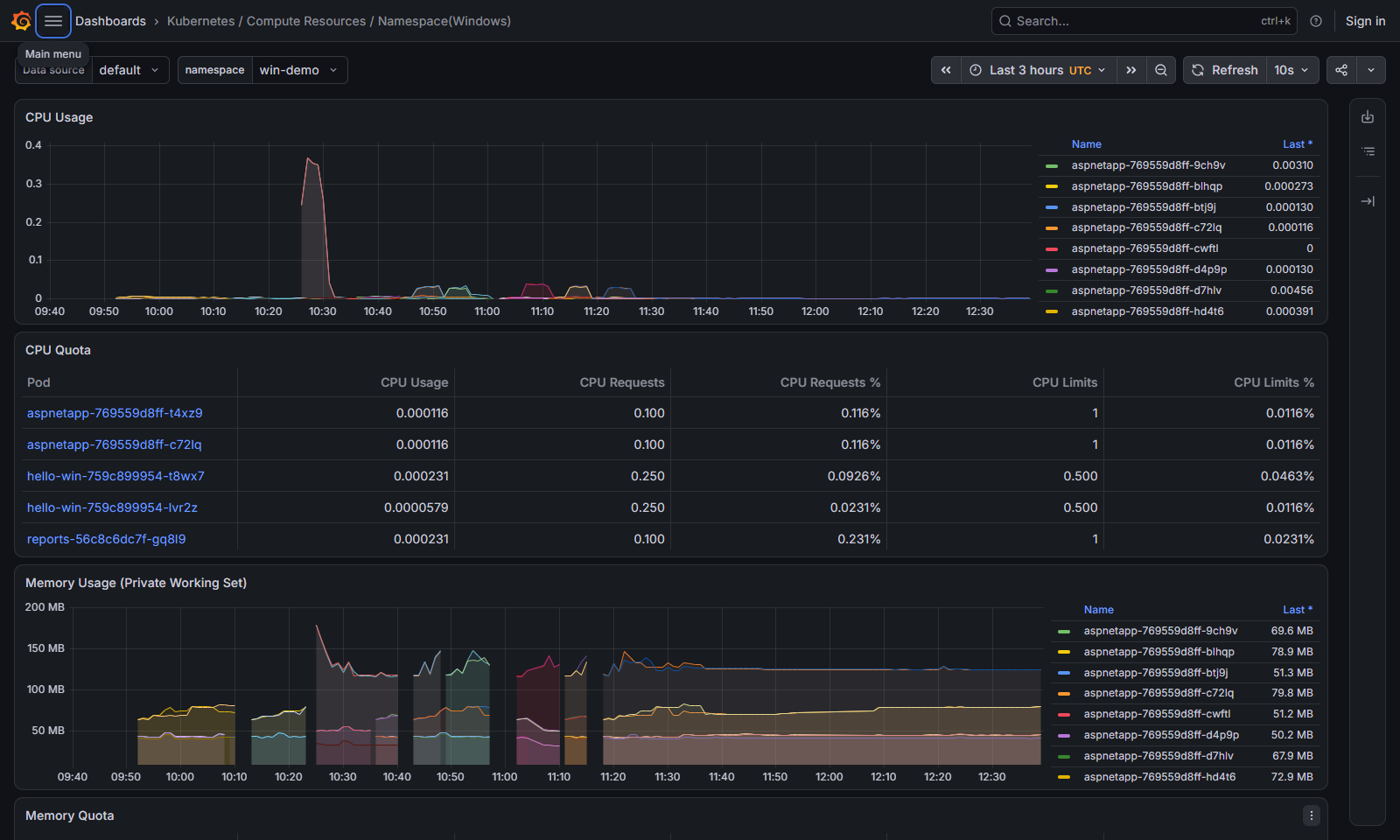
Port 9182 and the firewall
Prometheus goes to 192.168.10.25:9182, and the Windows firewall closes this port by default. The chart handles it itself, and not in the tidiest way — with an init container:
$ kubectl --context lab -n monitoring get ds kps-prometheus-windows-exporter \
    -o jsonpath='{.spec.template.spec.initContainers[0].args}'
["New-NetFirewallRule","-DisplayName","'windows-exporter'","-Direction","inbound","-Profile","Any","-Action","Allow","-LocalPort","9182","-Protocol","TCP"]
The rule opens 9182 to every address, and New-NetFirewallRule creates a new one every time the pod starts: after the pod was recreated once there were two rules, and so on. The init container cannot be switched off with a chart parameter. Node metrics are not passwords, but strangers have no business knowing the list of processes, services and network addresses. Narrowing access is helped by the fact that in the Windows firewall a blocking rule beats an allowing one: we add a Block rule for every address except the cluster's nodes.
PS C:\> New-NetFirewallRule -Name windows-exporter-block-others -DisplayName 'windows-exporter: only k8s nodes' `
          -Direction Inbound -Protocol TCP -LocalPort 9182 -Action Block `
          -RemoteAddress '0.0.0.0-192.168.10.22','192.168.10.27-255.255.255.255'
What remains allowed is 192.168.10.23–.26: the Linux nodes — Calico replaces the source address with the node's address when a pod's packet leaves the pod network, so Prometheus's request arrives from the address of the Linux node it runs on — and the Windows node itself. The latter is easy to miss: kubelet runs windows-exporter's readinessProbe and livenessProbe from the node's address. On the lab the first version of the rule closed it too — the probes started timing out, kubelet restarted the container, and the pod went into CrashLoopBackOff.
Useful queries
Windows metric names differ from Linux ones, and not all of them carry a unit suffix: the commit limit is windows_memory_commit_limit, without _bytes. And for the container metrics the namespace, pod and container labels are taken by the labels of the target itself — the windows-exporter pod — so Prometheus renamed the container's labels to exported_namespace, exported_pod and exported_container. For this case kube-prometheus-stack installs recording rules (kps-windows.pod.rules): windows_container_memory_usage and windows_container_private_working_set_usage — the same values with the pod's real labels taken from kube_pod_container_info.
# node CPU load, %
100 - avg by (instance) (rate(windows_cpu_time_total{mode="idle"}[5m])) * 100

# committed memory relative to the commit limit — the key Windows memory indicator
windows_memory_committed_bytes / windows_memory_commit_limit

# committed and working-set memory of the hello-win containers
windows_container_memory_usage{namespace="win-demo", pod=~"hello-win-.*"}
windows_container_private_working_set_usage{namespace="win-demo", pod=~"hello-win-.*"}

# a container's committed memory relative to its limit
windows_container_memory_usage / on (namespace, pod, container) kube_pod_windows_container_resource_memory_limit

# node services
windows_service_state{name=~"kubelet|containerd", state="running"}
On the lab, with two hello-win pods, aspnetapp and reports-writer on the node, they give this:
| Query | Value |
|---|---|
| node CPU load | 5.4 % |
| node committed memory relative to the limit | 0.31 |
committed memory of a hello-win container |
98 MiB |
| working-set memory of the same container | 42 MiB |
| committed memory relative to the 256 MiB limit | 0.38 |
kubelet and containerd in the running state |
1 and 1 |
A container's committed memory is more than twice its working set — and kubectl top shows exactly the working set (41 MiB). The job object's limit, however, counts committed memory, so hello-win is much closer to it than kubectl top suggests.
Since Windows has no OOM killer, the most useful alert rules are about memory. windows_memory_committed_bytes / windows_memory_commit_limit > 0.9 warns that the node is about to refuse memory to all containers at once, and before that it will go into paging. A container's committed memory to limit ratio above 0.9 is a forerunner of the VirtualAlloc failure we saw above and of a crash with an exit code instead of OOMKilled. Both expressions go into a PrometheusRule, as in part 32.
Updating Windows nodes
Monthly updates
Microsoft releases Windows security updates on the second Tuesday of the month (the "B" release, "Patch Tuesday"). On the same day rebuilt base images appear in MCR: Windows cannot be updated from inside a container, the image has no servicing mechanism, so every month Microsoft rebuilds nanoserver:ltsc2025 and servercore:ltsc2025 from scratch (Microsoft documentation). Hence two independent work streams:
 second Tuesday of the month
   │
   ├─► MCR: new nanoserver:ltsc2025, servercore:ltsc2025
   │      └─► Renovate updates the base digest, CI builds hello:1.3.1,
   │          rolled out as an ordinary Deployment update
   │
   └─► k8s-lab-win-1: drain → install updates → reboot
                      → check → uncordon
Matching revisions is not required. For Windows Server 2019 and later, a node and an image with different monthly updates are compatible: the build matters, not the revision — our hello:1.3 with the 26100.33674 base runs on the 26100.33438 node. But both rebuilding images and updating the node happen every month: holes are closed in both places, and the system libraries in the container are not the node's. Pinning the base by digest and a bot that updates it are from part 5.
The node. The order is the same as for Linux in part 35, with one correction: we have one Windows node. Evicted hello-win pods have nowhere to go — they will be Pending until the node returns, and a PodDisruptionBudget of minAvailable: 1, like hello's, would not let drain evict the second replica at all. Applications that must survive maintenance need at least two Windows nodes; in a test cluster with one Windows node, maintenance is a downtime window for Windows pods.
On Server Core, updates are installed through the sconfig menu or centrally through WSUS and group policies (covered in part 24 of the "Windows Server for beginners" series). The main thing is to forbid automatic restarts: Windows Update restarting the node without drain takes the pods down. The node is set to "download and notify" (in part 38 we switched sconfig to Manual), and we restart it ourselves:
$ kubectl drain k8s-lab-win-1 --ignore-daemonsets --delete-emptydir-data --timeout=10m
Warning: ignoring DaemonSet-managed Pods: calico-system/calico-node-windows-q54h2, kube-system/csi-smb-node-win-tmwv5, kube-system/kube-proxy-windows-z9qdq, monitoring/alloy-windows-f6ns9, monitoring/kps-prometheus-windows-exporter-l45kh
evicting pod win-demo/reports-writer-67b96b59b-g9wrq
evicting pod win-demo/aspnetapp-769559d8ff-vk445
evicting pod win-demo/aspnetapp-769559d8ff-dkp9z
evicting pod win-demo/hello-win-759c899954-9g74w
evicting pod win-demo/hello-win-759c899954-vwdq6
...
node/k8s-lab-win-1 drained
$ kubectl -n win-demo get pods
NAME                             READY   STATUS    RESTARTS   AGE
aspnetapp-769559d8ff-hd4t6       0/1     Pending   0          36s
aspnetapp-769559d8ff-xk5d5       0/1     Pending   0          36s
hello-win-759c899954-tkfg6       0/1     Pending   0          36s
hello-win-759c899954-tq5nc       0/1     Pending   0          35s
reports-writer-67b96b59b-rfb6z   0/1     Pending   0          36s
PS C:\> sconfig                     # "Install updates", all updates
PS C:\> Test-Path 'HKLM:\SOFTWARE\Microsoft\Windows\CurrentVersion\WindowsUpdate\Auto Update\RebootRequired'
True
PS C:\> Restart-Computer
After the restart the containerd and kubelet services start on their own, the DaemonSets restart the HostProcess pods of Calico, kube-proxy, csi-driver-smb, Alloy and windows-exporter, and Calico recreates the HNS network. On the lab with SSD disks containerd started 3 seconds after boot, kubelet after 5, and 10 seconds after Restart-Computer the node was already reporting to the API again.
While the lab VMs' disks were on an HDD, it was different: the node stayed NotReady for fifteen minutes, and the System log had this:
PS C:\> Get-WinEvent -FilterHashtable @{LogName='System'; ProviderName='Service Control Manager'} -MaxEvents 30 |
          Where-Object Id -in 7000,7001,7009 | Format-Table TimeCreated, Id, Message -Wrap

TimeCreated             Id Message
-----------             -- -------
11/7/2026 12:11:19 PM 7009 A timeout was reached (45000 milliseconds) while waiting for the containerd service to connect.
11/7/2026 12:11:19 PM 7000 The containerd service failed to start due to the following error:
                           The service did not respond to the start or control request in a timely fashion.
11/7/2026 12:11:19 PM 7001 The kubelet service depends on the containerd service which failed to start because of the following error:
                           The operation completed successfully.
The SCM waits 45 seconds for a service to respond at startup. On a slow disk containerd did not make it: at startup it reconciles the state of the remaining containers through HCS, and the vmcompute service was still only starting during those minutes. The "restart the service" recovery action that containerd registers fires only when a running service crashes, not when it fails to start, and kubelet, which depends on containerd, stayed stopped too. If this happens, delayed automatic start for both services helps — the SCM starts them about two minutes after boot, once the system is up:
PS C:\> sc.exe config containerd start= delayed-auto
PS C:\> sc.exe config kubelet start= delayed-auto
kubelet is delayed too: a service with ordinary automatic start starts its dependencies when it starts, and containerd would start in the same unlucky minute. On a fast disk this is not needed.
We wait for the node to return, check that the revision in status.nodeInfo.kernelVersion has grown, and give it back to the scheduler. A trap: kubectl wait --for=condition=Ready right after Restart-Computer finishes instantly — the node is still listed as Ready until the node controller notices that kubelet has stopped renewing its Lease (kube-controller-manager's --node-monitor-grace-period, 50 seconds by default), and a fast node manages to restart sooner and is never NotReady at all. A reliable sign of a restart is status.nodeInfo.bootID: kubelet reports the OS boot identifier, on Windows a boot counter. We remember it before the restart and wait for it to change:
$ BOOT=$(kubectl get node k8s-lab-win-1 -o jsonpath='{.status.nodeInfo.bootID}'); echo $BOOT
11
$ until [ "$(kubectl get node k8s-lab-win-1 -o jsonpath='{.status.nodeInfo.bootID}')" != "$BOOT" ]; do sleep 5; done
$ kubectl get node k8s-lab-win-1 -o jsonpath='{.status.nodeInfo.bootID}{"\n"}'
12
The second trap is an uncordon that comes too early. On the lab the node returned after 10 seconds, we removed the cordon right away, and the pods created in those first seconds, while Calico was still recreating the HNS network, were left without connectivity to the node: kubelet's probes did not reach them, hello-win went into CrashLoopBackOff, and aspnetapp never became ready.
$ kubectl -n win-demo get events --sort-by=.lastTimestamp | grep Unhealthy | tail -1
4m51s       Warning   Unhealthy                pod/aspnetapp-769559d8ff-btj9j        Readiness probe failed: Get "http://172.21.41.34:8080/": context deadline exceeded (Client.Timeout exceeded while awaiting headers)
The same pods, recreated a few minutes later, worked at once. The calico-node-windows and kube-proxy-windows containers do not restart instantly after boot: on the lab it took 28 seconds after Restart-Computer, that is, later than the node was back in the API. So before uncordon we wait until the node's Calico and kube-proxy HostProcess pods have restarted after boot and are ready — a fresh restart in the RESTARTS column and a full READY. With this wait all seven Windows pods of the lab were ready 19 seconds after uncordon, without a single restart:
$ kubectl get pods -A -o wide --field-selector spec.nodeName=k8s-lab-win-1 | grep -E 'NAME|calico-node|kube-proxy'
NAMESPACE       NAME                        READY   STATUS    RESTARTS      AGE   IP              NODE
calico-system   calico-node-windows-q54h2   2/2     Running   6 (11m ago)   14h   192.168.10.25   k8s-lab-win-1
kube-system     kube-proxy-windows-z9qdq    1/1     Running   3 (11m ago)   14h   192.168.10.25   k8s-lab-win-1
$ kubectl uncordon k8s-lab-win-1
node/k8s-lab-win-1 uncordoned
The waiting pods return to the node within seconds: the images stayed on its disk, so there is nothing to download again.
A crash power-off and cleaning up the node
A planned restart starts with drain; a crash does not. Let's check on the lab: turn off the k8s-lab-win-1 virtual machine without a shutdown, as in a power surge (Stop-VM -TurnOff in Hyper-V), and turn it back on 47 seconds later.
The first thing you see: while the node is off, the cluster does not notice. The node stays Ready for up to 50 seconds (--node-monitor-grace-period), and after that the pods stay put for another 5 minutes — every pod has a 300-second toleration for node.kubernetes.io/unreachable. All this time the hello-win endpoints are ready, and traffic goes to a powered-off node. Our node came back before it was declared unreachable:
14:04:16 node=Ready pods=[ 7 1/1/Running,] hello-win-eps=[true true ]
14:04:31 node=Ready pods=[ 7 0/1/Unknown,] hello-win-eps=[]
14:05:01 node=Ready pods=[ 4 0/1/Running, 3 1/1/Running,] hello-win-eps=[false false ]
Then it gets worse. After boot kubelet found that the pod sandboxes were gone and recreated them in place, with new addresses — in the first seconds, while Calico had not yet recreated the HNS network:
$ kubectl -n win-demo get events --sort-by=.lastTimestamp | grep -E 'SandboxChanged|Unhealthy' | tail -3
31s         Normal    SandboxChanged           pod/aspnetapp-769559d8ff-d4p9p        Pod sandbox changed, it will be killed and re-created.
23s         Warning   Unhealthy                pod/aspnetapp-769559d8ff-d4p9p        Readiness probe failed: Get "http://172.21.41.62:8080/": context deadline exceeded (Client.Timeout exceeded while awaiting headers)
15s         Warning   Unhealthy                pod/hello-win-759c899954-dkqlw        Startup probe failed: Get "http://172.21.41.4:8080/healthz": context deadline exceeded (Client.Timeout exceeded while awaiting headers)
The pods looked Running but had no network: they had no endpoints in the Calico HNS network, neither kubelet's probes nor Linux pods reached them, and reports could not see SQL Server. It does not go away by itself: Calico was ready a minute after power-on, and five minutes later hello-win was still restarting in a loop. The cure is recreating the pods — the new ones get a network right away:
$ kubectl -n win-demo delete pod --all
But the old pods get stuck in Terminating: kubelet cannot remove their sandboxes, because their HNS namespaces refer to a network that no longer exists:
$ kubectl -n win-demo describe pod aspnetapp-769559d8ff-d4p9p | grep FailedKillPod
  Warning  FailedKillPod     3m42s (x4 over 4m8s)   kubelet            error killing pod: failed to "KillPodSandbox" for "8e3b0fe0-fc30-4d70-b93d-10d10e3edfa8" with KillPodSandboxError: "rpc error: code = Unknown desc = failed to remove network namespace for sandbox …: hcnDeleteNamespace failed in Win32: The specified request is unsupported. …"
kubectl delete pod --force --grace-period=0 removes the objects from the API, but not from the node: the sandboxes stay in containerd as NotReady, and both crictl rmp -f and hnsdiag delete namespaces run into the same The specified request is unsupported error.
PS C:\> crictl pods --namespace win-demo --state NotReady
POD ID              CREATED             STATE               NAME                             NAMESPACE           ATTEMPT             RUNTIME
45a3409f3b865       9 minutes ago       NotReady            hello-win-759c899954-dkqlw       win-demo            1                   runhcs-wcow-process
799004ca4b9f7       9 minutes ago       NotReady            aspnetapp-769559d8ff-d4p9p       win-demo            1                   runhcs-wcow-process
...
The cleanup is the ordinary maintenance procedure — the same as for updates, only after the crash: drain, restart, wait for bootID to change and for Calico and kube-proxy to restart, uncordon. HNS namespaces do not survive a restart, and containerd removes the orphaned sandboxes calmly at startup:
PS C:\> crictl pods --namespace win-demo
POD ID              CREATED             STATE               NAME                NAMESPACE           ATTEMPT             RUNTIME
PS C:\> (hnsdiag list namespaces | Select-String '^Namespace').Count
1
On the lab, after such a restart all seven Windows pods were ready 20 seconds after uncordon. Hence the rule: a Windows node after a crash power-off is not considered healthy even if it is Ready. It is drained right away and restarted properly — this is faster than dealing with network-less pods one by one, and it leaves no garbage in containerd and HNS.
kubelet, kubeadm and containerd on the Windows node are upgraded in the same order as on Linux — after the control plane, on a drained node: stop the kubelet service, replace kubeadm.exe and kubelet.exe with the new version's files, run kubeadm upgrade node --patches C:\k\patches (kubeadm does not store patches, as covered in part 38), start the service. The version skew policy for the Windows node is the same.
A new Windows Server version
Every few years a new LTSC version of Windows Server comes out with a new build. Upgrading the node's OS in place is not a good idea: it is more reliable to bring in a new node and retire the old one, as in part 35. The order for a hybrid cluster follows from the compatibility rule: a new node runs images of the previous LTSC version, an old node does not run new images.
- Bring in nodes of the new version. kubelet itself gives them the
node.kubernetes.io/windows-buildlabel with the new build. A new RuntimeClass is created for them —windows-20NNwith its ownnodeSelector— the same taint and the same handler. - Rebuild images with two Windows variants. The index contains
windows/amd64withos.version26100 andwindows/amd64with the new build; each node takes its own. The build is two runs with different base images andimagetools create, as above. - Switch the Deployment to the new RuntimeClass with an ordinary update: the pods are recreated on the new nodes.
- Drain and retire the old nodes, then remove the
ltsc2025variant and the old RuntimeClass from the build.
Step 2 can be postponed: thanks to backward compatibility, new nodes will run ltsc2025 images too. But the Kubernetes documentation still talks about strict compatibility between node and image versions, and the platform selection code in containerd knows only the LTSC versions that existed when it was released. So moving to a new base is a mandatory part of the migration, and backward compatibility is headroom for its duration.
Looking at it by hand
Everything below is in the test cluster (current context lab). Pods and nodes:
$ kubectl get nodes -L kubernetes.io/os,node.kubernetes.io/windows-build
NAME               STATUS   ROLES           AGE    VERSION   OS        WINDOWS-BUILD
k8s-lab-master-1   Ready    control-plane   15h    v1.37.2   linux
k8s-lab-node-1     Ready    <none>          14h    v1.37.2   linux
k8s-lab-node-2     Ready    <none>          14h    v1.37.2   linux
k8s-lab-win-1      Ready    <none>          13h    v1.37.2   windows   10.0.26100
$ kubectl -n win-demo get pods -l app.kubernetes.io/name=hello-win -o wide
NAME                         READY   STATUS    RESTARTS   AGE   IP             NODE
hello-win-759c899954-tkfg6   1/1     Running   0          42m   172.21.41.16   k8s-lab-win-1
hello-win-759c899954-tq5nc   1/1     Running   0          42m   172.21.41.18   k8s-lab-win-1
Which image variant containerd took:
PS C:\> crictl images | Select-String 'hello'
ghcr.io/example/hello                         1.3                             7ffd115839b16       201MB
PS C:\> crictl inspecti ghcr.io/example/hello:1.3 | ConvertFrom-Json |
          Select-Object -ExpandProperty info | Select-Object -ExpandProperty imageSpec |
          Select-Object os, 'os.version', architecture

os      os.version       architecture
--      ----------       ------------
windows 10.0.26100.33674 amd64
The pod status's imageID is the index digest sha256:912dccf9…, shared by all platforms, while the node holds only the Windows variant with its base: 201 MB versus seven megabytes for the Linux variant.
What the limits turned into — in the container spec that containerd passed to runhcs:
PS C:\> $id = crictl ps --name hello -q | Select-Object -First 1
PS C:\> (crictl inspect $id | ConvertFrom-Json).info.runtimeSpec.windows.resources | ConvertTo-Json
{
    "cpu": {
        "maximum": 1250
    },
    "memory": {
        "limit": 268435456
    }
}
maximum: 1250 is 12.5 % of the node's four CPUs, that is half a core; limit is 256 MiB. There is no trace of requests here. Actual consumption:
$ kubectl -n win-demo top pods -l app.kubernetes.io/name=hello-win
NAME                         CPU(cores)   MEMORY(bytes)
hello-win-759c899954-tkfg6   0m           41Mi
hello-win-759c899954-tq5nc   0m           41Mi
$ kubectl -n demo top pods
NAME                     CPU(cores)   MEMORY(bytes)
hello-55fb8f8684-69mvv   1m           3Mi
hello-55fb8f8684-nztv2   1m           4Mi
About 41 MiB of working set — together with the container's system processes; the same hello on Linux takes 3–4 MiB.
The SMB volume on the node — the global mapping and the staging link:
PS C:\> Get-SmbGlobalMapping | Format-List Status, RemotePath, RequirePrivacy

Status         : OK
RemotePath     : \\files.example.com\k8s\win-demo-reports-pvc-ea3d8e0f-a51d-4662-9e44-b9174787e9a2
RequirePrivacy : True

PS C:\> Get-Item C:\var\lib\kubelet\plugins\kubernetes.io\csi\smb.csi.k8s.io\*\globalmount |
          Select-Object LinkType, Target

LinkType     Target
--------     ------
SymbolicLink {UNC\files.example.com\k8s\win-demo-reports-pvc-ea3d8e0f-a51d-4662-9e44-b9174787e9a2}

PS C:\> Get-SmbConnection -ServerName files.example.com | Format-List Dialect, Encrypted, Signed

Dialect   : 3.1.1
Encrypted : True
Signed    : False
Dialect 3.1.1, encryption on, and separate signing is not needed: encrypted messages are protected from tampering anyway (Signed : False is not a hole). The UserName field of Get-SmbConnection does not help here: it holds the account the connection is opened from on the node — the computer itself — not the account from the Secret. Who logged on to the share is visible on the server:
user@files:~$ sudo smbstatus -b | tail -1
47241   svc-k8s-smb  svc-k8s-smb  192.168.10.25 (ipv4:192.168.10.25:51032)  SMB3_11           AES-128-GCM          AES-128-GMAC
A session as svc-k8s-smb from the Windows node, SMB 3.1.1 with AES-128-GCM encryption — the same as smbstatus showed for the Linux nodes in part 24. And in the volume's directory on the server there is the file reports-writer is writing.
Logs in the test cluster's Loki. logcli is set up as in part 33: a port-forward to loki-gateway and LOKI_ADDR:
$ kubectl --context lab -n monitoring port-forward svc/loki-gateway 3100:80 &
$ export LOKI_ADDR=http://localhost:3100
$ logcli query --since=10m --limit=1 '{namespace="win-demo", container="hello", node="k8s-lab-win-1"} |= "request served"'
Common labels: {app="hello-win", container="hello", detected_level="info", filename="C:\\var\\log\\pods\\win-demo_hello-win-759c899954-tq5nc_3b4bacb8-8648-4657-b537-50eb6d76f8e6\\hello\\0.log", namespace="win-demo", node="k8s-lab-win-1", pod="hello-win-759c899954-tq5nc", service_name="hello-win", stream="stdout"}
2026-11-07T12:51:08+03:00 {} {"time":"2026-11-07T12:51:08.5249253+03:00","level":"INFO","msg":"request served","method":"GET","path":"/","status":200,"duration_ms":0,"trace_id":"eb1358f432ff7e6221bed5aad2d9a8f9","span_id":"277be3ba4e239b4b","trace_sampled":false}
The node's event log. To get an error into the System channel, let's kill the containerd process — the containers keep running, their shims do not depend on containerd:
PS C:\> Stop-Process -Name containerd -Force
$ logcli query --since=1h --limit=1 -o raw '{job="windows-events"} | json | event_id="7031" | line_format "{{.source}} {{.event_id}} {{.levelText}}: {{.message}}"'
Service Control Manager 7031 Error: The containerd service terminated unexpectedly.  It has done this 1 time(s).  The following corrective action will be taken in 15000 milliseconds: Restart the service.
The service control manager's event 7031 reached Loki in three seconds. After 15 seconds the SCM restarted containerd itself — that is the recovery action containerd registers for its service — and kubelet reconnected to it without restarting. The full record is JSON with the source, channel, event code, level, time, record number and the process that wrote it (services.exe); the | json filter parses these fields into labels, and the selection is built on them.
The Windows node now runs its own application from the same tag as Linux, with clear limits, graceful shutdown, an SMB volume, logs in Loki and metrics in Prometheus, and updating the node has become a monthly routine. But hello-win still reaches external resources only as an anonymous process: the accounts inside the container exist only in the container itself, and you cannot log on to an Active Directory domain as them.
Sources
- Kubernetes: Windows containers in Kubernetes, Resource Management for Windows nodes, HostProcess pods, Resize CPU and Memory Resources, Node Shutdowns.
- Microsoft: Windows container version compatibility, Update Windows Server containers, Persistent storage in containers, LogMonitor, hcsshim PR #1416.
- BuildKit and containerd: BuildKit on Windows, PR #3619 and PR #5714 on
os.version, Windows platform matching in containerd. - Storage: csi-proxy, csi-driver-smb chart parameters.
- Observability: windows_exporter, prometheus-windows-exporter chart, loki.source.windowsevent, Go os/signal.
Next is part 40, gMSA: signing in to Active Directory from Windows pods. What a group managed service account is and why a pod needs a domain account; the credential spec and the GMSACredentialSpec CRD, the gMSA webhook and RBAC for using a spec; domain-joined nodes versus the CCG (Container Credential Guard) plugin for non-domain nodes; checking with nltest and Kerberos tickets, and typical errors.
Only registered users can leave a comment.
Sign in or register to leave a comment.