Kubernetes for beginners. Part 41: How to set up GitOps with Argo CD
All parts of the series “Kubernetes for beginners”Over 40 parts we have put dozens of objects into the cluster: the Deployment and Service of the hello application, an HTTPRoute for Traefik, a Certificate for cert-manager, NetworkPolicy, ServiceMonitor, platform components. Each of them got there the same way — with a kubectl apply or helm upgrade command from the administrator's workstation. Kustomize from part 26 and Helm from part 27 brought order to the manifests, but not to the way they are delivered: what is in the cluster right now is known only to the cluster itself, and who put it there and when is at best the command history in somebody's terminal. The last main part of the series is about GitOps: an approach in which the single source of truth about the cluster is a Git repository, and changes are brought into the cluster by a controller that compares Git with reality by itself and eliminates the difference. This is the same reconciliation loop the series started with in part 1, only raised one level higher. The tool is Argo CD.
GitOps principles
GitOps is formulated as four principles (they are described by the OpenGitOps working group at the CNCF, the foundation that develops Kubernetes and the projects around it):
- Declarative. The desired state of the system is described in full — with manifests, charts, Kustomize overlays — rather than as a sequence of commands that lead to it.
- Versioned and immutable. The description is stored where every change has an author, a time, a reason and a way to roll back: in Git. A change to the cluster is a commit, a review of the change is a review of a merge request, a rollback is
git revert. - Pulled. Changes are fetched into the cluster by an agent inside the cluster, not pushed from outside by a CI system or a person.
- Continuously reconciled. The agent does not apply changes once; it continuously compares the desired state with the actual one and brings them together, including when the divergence came not from Git but from a manual edit in the cluster.
The third point matters more than it seems. Let's compare two delivery schemes:
 push: CI pushes into the cluster

 developer ──► Git ──► CI pipeline ──── kubectl apply ────► kube-apiserver
                       (holds a kubeconfig with
                        write access to the cluster)

 pull: an agent in the cluster pulls from Git

 developer ──► Git ◄──── git fetch, every 3 minutes ──── Argo CD ──► kube-apiserver
                         (read-only key)                 (inside the cluster)
In the push scheme the keys with write access to the cluster live in the CI system, usually with administrator rights on all clusters it delivers anything to: compromising CI means compromising all the clusters. The cluster also has to be reachable from CI over the network. In the pull scheme only the agent inside the cluster has write access to it, and the cluster reaches outside by itself, and with a read-only key to the repository at that. And only a pull agent, which runs all the time, can notice that someone changed an object by hand — a CI pipeline remembers the cluster only when it is run.
Consequences for day-to-day work:
- under GitOps nobody runs
kubectl apply,kubectl editandhelm upgradeby hand on the cluster any more: a manual edit will be rolled back or, at the very least, highlighted as a divergence; - people's access to the cluster can be narrowed down to reading and diagnostics (
logs,describe,execfor debugging), and changes go through merge requests; - restoring a cluster after a loss means installing the agent and pointing it at the repository: everything described in Git comes back by itself. This complements the etcd snapshots from part 34 well, but does not replace them: Git does not contain the data created in the cluster (PVCs, Secrets issued by cert-manager, the state of operators).
Argo CD: what it is made of
Argo CD is a GitOps controller from the Argo project of the CNCF. It keeps the description of applications in its own CRDs (CRDs and operators are covered in part 28), renders the manifests from Git by itself and applies them to the cluster by itself. The components of a standard installation:
| Component | Kind | What it does |
|---|---|---|
argocd-application-controller |
StatefulSet | the heart of the system: watches Application objects, compares the rendered manifests with the live objects in the cluster, sets statuses, performs synchronization |
argocd-repo-server |
Deployment | clones repositories and caches them, turns a directory into manifests: kustomize build, helm template, plain YAML or a plugin |
argocd-server |
Deployment | the API for the web UI and the argocd CLI, user authentication, Argo CD RBAC, receiving webhooks from the Git server |
argocd-applicationset-controller |
Deployment | generates Application objects from an ApplicationSet template |
argocd-redis |
Deployment | cache: rendered manifests, the state of the resource tree; not a source of truth, it can be lost |
argocd-dex-server |
Deployment | Dex, a single sign-on (SSO) broker: accepts logins via OIDC, LDAP, SAML and issues an OIDC token to Argo CD |
argocd-notifications-controller |
Deployment | notifications about synchronizations and failures to messengers and email |
 Git (k8s-config)                       cluster, namespace argocd
 ┌──────────────────┐   git fetch    ┌──────────────────────────────────┐
 │ apps/hello/...   │◄───────────────│ argocd-repo-server               │
 │ platform/...     │  deploy key    │   kustomize build / helm template│
 └──────────────────┘  (read-only)   └────────────────┬─────────────────┘
                                                      │ manifests
                                                      ▼
                                     ┌──────────────────────────────────┐
                                     │ argocd-application-controller    │
                                     │   desired (Git)                  │
                                     │     compared with                │
                                     │   live (watch kube-apiserver)    │
                                     │   → Synced / OutOfSync           │
                                     │   → apply, prune                 │
                                     └────────────────┬─────────────────┘
                                                      │ server-side apply
                                                      ▼
                                     ┌──────────────────────────────────┐
                                     │ kube-apiserver                   │
                                     └──────────────────────────────────┘
The controller keeps in memory a cache of all the cluster objects it manages, through watch — just like any Kubernetes controller from part 3. It rereads Git every 120 seconds plus a jitter of up to 60 seconds (so that hundreds of applications do not hit Git at the same moment), meaning a change in the repository reaches the cluster in at most 3 minutes. If the Git server supports webhooks, it is configured to call argocd-server on every push — then synchronization starts within seconds.
Installation
Argo CD is installed with the official manifest into the argocd namespace. The link is taken with a specific version, not from the stable branch: that way a repeated installation half a year later gives the same result, and an upgrade becomes a deliberate step. At the time of writing the current version is 3.6.1:
$ kubectl create namespace argocd
namespace/argocd created
$ kubectl apply -n argocd --server-side --force-conflicts \
    -f https://raw.githubusercontent.com/argoproj/argo-cd/v3.6.1/manifests/install.yaml
customresourcedefinition.apiextensions.k8s.io/applications.argoproj.io serverside-applied
customresourcedefinition.apiextensions.k8s.io/applicationsets.argoproj.io serverside-applied
customresourcedefinition.apiextensions.k8s.io/appprojects.argoproj.io serverside-applied
serviceaccount/argocd-application-controller serverside-applied
...
statefulset.apps/argocd-application-controller serverside-applied
--server-side is mandatory here: the ApplicationSet CRD file takes one and a half megabytes, and a regular kubectl apply puts a copy of the whole object into the last-applied-configuration annotation, whose limit is 262,144 bytes for all annotations of an object. Without the flag the installation fails on this CRD:
$ kubectl apply -f applicationset-crd.yaml
The CustomResourceDefinition "applicationsets.argoproj.io" is invalid: metadata.annotations: Too long: may not be more than 262144 bytes
Server-side apply (part 3) keeps field ownership in managedFields and does not write the annotation. --force-conflicts takes over the fields that someone else owned — it is needed when upgrading on top of a previous installation.
Argo CD has its own compatibility table with Kubernetes versions (the Tested Kubernetes Versions page in the documentation): 3.6 is tested with Kubernetes from 1.34 to 1.37, that is, with the lab too, which runs 1.37 after part 35. Before upgrading Kubernetes in a cluster with Argo CD, this table is checked just like the list of deprecated APIs.
A minute later all the components are running:
$ kubectl -n argocd get pods
NAME                                                READY   STATUS    RESTARTS   AGE
argocd-application-controller-0                     1/1     Running   0          65s
argocd-applicationset-controller-794bb95c9d-d9ljf   1/1     Running   0          66s
argocd-dex-server-66cf64bfcf-r2w4x                  1/1     Running   0          66s
argocd-notifications-controller-5878c8d644-kjppp    1/1     Running   0          66s
argocd-redis-5869b7547-5kxrs                        1/1     Running   0          66s
argocd-repo-server-7d55cc466b-blj7h                 1/1     Running   0          66s
argocd-server-85b849c688-79l5f                      1/1     Running   0          66s
The Argo CD pods themselves are light, but on startup application-controller subscribes via watch to all the object types in the cluster it can manage, and the first synchronization of a dozen applications means hundreds of apply requests and --dry-run=server checks. All of this lands on kube-apiserver and etcd. In the lab, a master with 4 GB of memory, which already hosted the apiserver, etcd and the monitoring components from previous parts, stopped responding even over SSH ten seconds after the root application (more on it below) was started, and it had to be powered off. With 8 GB the same synchronization went through without noticeable load. The master of a cluster under GitOps needs spare memory, not just enough.
The install.yaml manifest gives the controller cluster administrator rights: it must be able to create any object described in Git. We will restrict what exactly may be delivered not by cutting these rights, but with Argo CD projects — see below.
CLI and login. The argocd utility is downloaded from the same releases page, and its version must match the server:
$ curl -fsSLo argocd https://github.com/argoproj/argo-cd/releases/download/v3.6.1/argocd-linux-amd64
$ curl -fsSLO https://github.com/argoproj/argo-cd/releases/download/v3.6.1/cli_checksums.txt
$ grep argocd-linux-amd64 cli_checksums.txt | sed 's/argocd-linux-amd64/argocd/' | sha256sum -c
argocd: OK
$ sudo install -m 0755 argocd /usr/local/bin/argocd
$ argocd version --client --short
argocd: v3.6.1+94037c4
The installation creates an admin user with a random password in the Secret argocd-initial-admin-secret:
$ argocd admin initial-password -n argocd
Xq7vP2mK9tLw4RzB

 This password must be only used for first time login. We strongly recommend you update the password using `argocd account update-password`.
$ kubectl -n argocd port-forward svc/argocd-server 8080:443 &
$ argocd login localhost:8080 --username admin --insecure
Password:
'admin:login' logged in successfully
Context 'localhost:8080' updated
$ argocd account update-password
...
Password updated
Context 'localhost:8080' updated
$ kubectl -n argocd delete secret argocd-initial-admin-secret
secret "argocd-initial-admin-secret" deleted from argocd namespace
--insecure is needed because argocd-server still works with a self-signed certificate for now. Permanent access to the web UI and the API is set up through Traefik: in the ConfigMap argocd-cmd-params-cm you set server.insecure: "true" (TLS is terminated by Traefik), and the certificate for argocd.apps.example.com is issued by cert-manager, as in part 19. The Argo CD web UI shows the object tree of every application with their statuses and the difference from Git — handy for an overview, but everything you can do in it can also be done with the CLI and YAML, so from here on we work in the CLI and show the UI in two screenshots. Once single sign-on through Dex or OIDC is set up, the admin user is disabled (admin.enabled: "false" in the ConfigMap argocd-cm): one shared password for everyone is exactly what GitOps leads away from.
The configuration repository
The cluster configuration is kept in a separate repository, not next to the application code. The reasons: they have different cycles (code changes dozens of times a day, the cluster configuration less often and with a different review), different people with merge rights, and Argo CD does not need to react to every commit to the code. The application build pipeline from part 5 builds the image, pushes it to the registry and opens a merge request with the new tag in the configuration repository — from there GitOps takes over.
The structure:
k8s-config/
├── clusters/
│   └── stand/
│       ├── root.yaml               root Application (App of Apps)
│       ├── projects/
│       │   ├── demo.yaml           AppProject for applications
│       │   └── platform.yaml       AppProject for the platform
│       └── apps/
│           ├── platform.yaml       ApplicationSet over the platform/* directories
│           └── hello.yaml          ApplicationSet: hello in dev and prod
├── platform/
│   ├── cert-manager/
│   ├── metallb/
│   ├── namespaces/
│   └── traefik/
└── apps/
    └── hello/
        ├── base/
        │   ├── kustomization.yaml
        │   ├── deployment.yaml
        │   ├── service.yaml
        │   ├── httproute.yaml
        │   ├── networkpolicy.yaml
        │   └── servicemonitor.yaml
        └── overlays/
            ├── dev/
            │   └── kustomization.yaml
            └── prod/
                ├── kustomization.yaml
                ├── hpa.yaml
                ├── pdb.yaml
                └── smoke-test.yaml
Environments as directories, not branches. The temptation to make a dev branch and a prod branch is strong, but in practice environment branches drift apart: a fix made in prod is forgotten to be carried over to dev, a merge between branches brings in unrelated changes, and the answer to the question "how does prod differ from dev" is a git diff of two branches full of extraneous noise. With directories, the whole difference between environments is the content of overlays/dev and overlays/prod, visible in a single commit. Promoting a version from dev to prod is a merge request that changes the image tag in overlays/prod/kustomization.yaml. All Applications look at one branch, main, protected from direct pushes: changes go only through review.
The hello application in full
Base is what is the same in all environments. These are the same objects we created in parts 7, 15, 18, 20 and 32, put together. hello has no Certificate of its own: the HTTPRoute attaches to the https listener of the apps gateway, the listener already has a certificate for *.apps.example.com from part 19, and the gateway is described in the platform application platform/traefik.
apps/hello/base/kustomization.yaml:
apiVersion: kustomize.config.k8s.io/v1beta1
kind: Kustomization
resources:
- networkpolicy.yaml
- deployment.yaml
- service.yaml
- httproute.yaml
- servicemonitor.yaml
deployment.yaml — with the security settings from part 30 and without the replicas field: it is managed by the overlays and autoscaling.
apiVersion: apps/v1
kind: Deployment
metadata:
  name: hello
  labels: { app.kubernetes.io/name: hello }
spec:
  selector:
    matchLabels: { app.kubernetes.io/name: hello }
  template:
    metadata:
      labels: { app.kubernetes.io/name: hello }
    spec:
      securityContext:
        runAsNonRoot: true
        runAsUser: 65532
        seccompProfile: { type: RuntimeDefault }
      topologySpreadConstraints:
      - maxSkew: 1
        topologyKey: kubernetes.io/hostname
        whenUnsatisfiable: ScheduleAnyway
        labelSelector:
          matchLabels: { app.kubernetes.io/name: hello }
      containers:
      - name: hello
        image: ghcr.io/example/hello
        ports:
        - { name: http, containerPort: 8080 }
        readinessProbe:
          httpGet: { path: /healthz, port: http }
        livenessProbe:
          httpGet: { path: /healthz, port: http }
        resources:
          requests: { cpu: 50m, memory: 32Mi }
          limits:   { memory: 64Mi }
        securityContext:
          allowPrivilegeEscalation: false
          readOnlyRootFilesystem: true
          capabilities: { drop: ["ALL"] }
The rest briefly:
# service.yaml
apiVersion: v1
kind: Service
metadata:
  name: hello
  labels: { app.kubernetes.io/name: hello }
spec:
  selector: { app.kubernetes.io/name: hello }
  ports:
  - { name: http, port: 80, targetPort: http }
---
# httproute.yaml
apiVersion: gateway.networking.k8s.io/v1
kind: HTTPRoute
metadata:
  name: hello
spec:
  parentRefs:
  - { name: apps, namespace: traefik, sectionName: https }
  hostnames: [hello.apps.example.com]
  rules:
  - backendRefs:
    - { name: hello, port: 80 }
---
# networkpolicy.yaml
apiVersion: networking.k8s.io/v1
kind: NetworkPolicy
metadata:
  name: hello
  annotations:
    argocd.argoproj.io/sync-wave: "-1"
spec:
  podSelector:
    matchLabels: { app.kubernetes.io/name: hello }
  policyTypes: [Ingress]
  ingress:
  - from:
    - namespaceSelector:
        matchLabels: { kubernetes.io/metadata.name: traefik }
    - namespaceSelector:
        matchLabels: { kubernetes.io/metadata.name: monitoring }
    - podSelector:
        matchLabels: { app.kubernetes.io/component: smoke-test }
    ports:
    - { port: http }
---
# servicemonitor.yaml
apiVersion: monitoring.coreos.com/v1
kind: ServiceMonitor
metadata:
  name: hello
  labels: { release: kube-prometheus-stack }
spec:
  selector:
    matchLabels: { app.kubernetes.io/name: hello }
  endpoints:
  - { port: http, path: /metrics, interval: 30s }
The selectors are written explicitly in every object instead of being added by the Kustomize label transformer: for NetworkPolicy it fills in selectors only where they already exist, and an empty podSelector: {} would have stayed empty — the policy would silently have applied to all pods in the namespace. The release label on the ServiceMonitor is the one by which Prometheus from kube-prometheus-stack (part 32) finds ServiceMonitors; the NetworkPolicy lets only Traefik, Prometheus and the check Job, described below, through to the pods.
The dev overlay — one replica, its own host name (covered by the same wildcard certificate of the gateway) and the image tag the pipeline has just built:
# apps/hello/overlays/dev/kustomization.yaml
apiVersion: kustomize.config.k8s.io/v1beta1
kind: Kustomization
namespace: demo-dev
resources:
- ../../base
images:
- name: ghcr.io/example/hello
  newTag: "1.1"
patches:
- target: { kind: Deployment, name: hello }
  patch: |
    - op: add
      path: /spec/replicas
      value: 1
- target: { kind: HTTPRoute, name: hello }
  patch: |
    - op: replace
      path: /spec/hostnames/0
      value: hello-dev.apps.example.com
The prod overlay — an image pinned by digest (a tag can be overwritten in the registry, a digest cannot, see part 5), autoscaling as in part 32 and a PodDisruptionBudget as in part 13:
# apps/hello/overlays/prod/kustomization.yaml
apiVersion: kustomize.config.k8s.io/v1beta1
kind: Kustomization
namespace: demo
resources:
- ../../base
- hpa.yaml
- pdb.yaml
- smoke-test.yaml
images:
- name: ghcr.io/example/hello
  newTag: "1.0"
  digest: sha256:a5066cd40ef37b9b889ddfbe9c1860b3afe231b96b975000e0edca3fdd6f4a4a
# apps/hello/overlays/prod/hpa.yaml
apiVersion: autoscaling/v2
kind: HorizontalPodAutoscaler
metadata:
  name: hello
spec:
  scaleTargetRef: { apiVersion: apps/v1, kind: Deployment, name: hello }
  minReplicas: 2
  maxReplicas: 6
  metrics:
  - type: Resource
    resource:
      name: cpu
      target: { type: Utilization, averageUtilization: 70 }
---
# apps/hello/overlays/prod/pdb.yaml
apiVersion: policy/v1
kind: PodDisruptionBudget
metadata:
  name: hello
spec:
  minAvailable: 1
  selector:
    matchLabels: { app.kubernetes.io/name: hello }
Why the Deployment in prod has no replicas: the number of replicas is changed by the HPA. If it were in Git, Argo CD would see a divergence after every HPA decision and, with selfHeal, would return the value from Git, while the HPA would return its own, and they would argue forever. The general GitOps rule: Git describes only the fields owned by a human; fields owned by a controller are not written to Git. If a field cannot be removed (for example, it is set by someone else's Helm chart), Argo CD can be told not to compare it — ignoreDifferences in the Application.
You can check what comes out before committing, with the same command repo-server will run:
$ kubectl kustomize apps/hello/overlays/prod | grep -E '^kind:' | sort
kind: Deployment
kind: HorizontalPodAutoscaler
kind: HTTPRoute
kind: Job
kind: NetworkPolicy
kind: PodDisruptionBudget
kind: Service
kind: ServiceMonitor
$ kubectl kustomize apps/hello/overlays/prod | grep 'image:'
      - image: ghcr.io/example/hello:1.0@sha256:a5066cd40ef37b9b889ddfbe9c1860b3afe231b96b975000e0edca3fdd6f4a4a
        image: busybox:1.37
Kustomize outputs object fields in alphabetical order, so image of the hello container ended up as the first field of the list item, before name. A tag and a digest together give a tag@digest reference: the runtime pulls the image by digest, and the tag stays for humans.
The demo and demo-dev namespaces with Pod Security labels are described separately, in the platform application platform/namespaces/. The CreateNamespace=true sync option would create a namespace without labels and without policies, so we do not use it. If on the first installation hello is synchronized before the namespace appears or before the traefik application has installed the Gateway API CRDs, the synchronization ends with an error and is repeated by retry. That is exactly what happened in the lab: the first attempts of hello-dev and hello-prod ended with the message failed to discover server resources for group version gateway.networking.k8s.io/v1: the server could not find the requested resource, and the fifth one, three minutes later, went through.
Repository access: deploy key
Argo CD needs only read access to the repository. The best way is a deploy key: an SSH key tied not to a person but to a single repository, with read-only rights. Any Git server supports it. The key is created without a passphrase (the controller would not be able to enter one), the public part is added to the repository settings on the Git server, and the private part goes into a Secret in the argocd namespace:
$ ssh-keygen -t ed25519 -N '' -C argocd@stand -f ./argocd-deploy-key
Generating public/private ed25519 key pair.
Your identification has been saved in ./argocd-deploy-key
Your public key has been saved in ./argocd-deploy-key.pub
The key fingerprint is:
SHA256:zw017JzxRc0lI3/P1FIRSxZt0fojC6cGdWB1N7YmRz8 argocd@stand
...
$ cat argocd-deploy-key.pub      # → into the k8s-config repository settings, read-only
ssh-ed25519 AAAAC3NzaC1lZDI1NTE5AAAAIHVLI6SNSii+DzwFcVoQ7McrOmwPyjoajlBQ3G9LWe4s argocd@stand
$ kubectl -n argocd create secret generic repo-k8s-config \
    --from-literal=type=git \
    --from-literal=url=git@git.example.com:platform/k8s-config.git \
    --from-file=sshPrivateKey=./argocd-deploy-key
secret/repo-k8s-config created
$ kubectl -n argocd label secret repo-k8s-config argocd.argoproj.io/secret-type=repository
secret/repo-k8s-config labeled
$ shred -u argocd-deploy-key
$ ssh-keyscan git.example.com | argocd cert add-ssh --batch
$ argocd repo list
TYPE  NAME  REPO                                         INSECURE  OCI    LFS    CREDS  STATUS      MESSAGE  PROJECT
git         git@git.example.com:platform/k8s-config.git  false     false  false  false  Successful
Argo CD finds repositories by the label argocd.argoproj.io/secret-type: repository on a Secret; STATUS Successful in argocd repo list means repo-server connected with the key and read the repository. The command with ssh-keyscan puts the public SSH keys of the Git server into the ConfigMap argocd-ssh-known-hosts-cm: without them Argo CD refuses to connect, because it cannot make sure it is talking to the real server. The keys obtained by ssh-keyscan are worth comparing with what the Git server administrator shows: ssh-keyscan by itself does not verify authenticity. For GitHub, GitLab, Bitbucket and Azure DevOps the keys are already in this ConfigMap after installation, and for them the command adds nothing (Successfully created 0 SSH known host entries).
The Secret with the key itself does not go into Git — it is one of the few things created by hand during the initial installation (or delivered in one of the ways from the section on secrets).
Application
Application is an Argo CD CRD that describes one application: where to take the manifests from and where to apply them.
apiVersion: argoproj.io/v1alpha1
kind: Application
metadata:
  name: hello-prod
  namespace: argocd
  finalizers:
  - resources-finalizer.argocd.argoproj.io
spec:
  project: demo
  source:
    repoURL: git@git.example.com:platform/k8s-config.git
    targetRevision: main
    path: apps/hello/overlays/prod
  destination:
    server: https://kubernetes.default.svc
    namespace: demo
  syncPolicy:
    automated:
      prune: true
      selfHeal: true
    syncOptions:
    - ServerSideApply=true
    - PruneLast=true
    retry:
      limit: 5
      backoff: { duration: 10s, factor: 2, maxDuration: 3m }
The fields:
source— the repository, a branch or tag (targetRevision) and a directory. repo-server decides by itself how to render it: there is akustomization.yaml—kustomize build; there is aChart.yaml—helm template; otherwise — all YAML files of the directory. Instead ofpaththere can bechartwith the address of a Helm repository — then Argo CD installs the chart without Git, and the values are set inhelm.valuesObject. There is no Helm release in this case: Argo CD uses Helm only as a template engine and applies the result by itself, sohelm listdoes not show such applications;destination— the cluster and the default namespace.https://kubernetes.default.svcis the cluster where Argo CD runs; other clusters are registered with Secrets holding their address and credentials;syncPolicy.automated— synchronize automatically as soon as Git and the cluster diverge. Without it Argo CD only shows the divergence, and a human synchronizes — with theargocd app synccommand or a button;prune: true— delete from the cluster the objects that were deleted from Git. It is off by default: Argo CD is cautious and only marks what was removed from Git. Withoutprunethe cluster gradually accumulates objects Git no longer knows anything about;selfHeal: true— restore the state from Git if an object was changed in the cluster bypassing Git. The first attempt comes right after detection, and if the object keeps being changed, the next ones come with a pause starting at 2 seconds that triples up to 5 minutes (the controller's--self-heal-backoff-*flags): this way Argo CD does not get into an endless tug of war with another controller. WithoutselfHealthe manual edit stays, and the application is simply marked OutOfSync;ServerSideApply=true— use server-side apply instead of the client-side one: without the annotation size limit and with honest field ownership. Fields set by other controllers (the same HPA) stay theirs. Since version 3.6 this option also enables comparison on the server side (Server-Side Diff): Argo CD makes a trial server-side apply with--dry-run=serverand compares the result with the live object, so default values and admission webhooks take part in the comparison too;PruneLast=true— delete the extra objects at the very end of synchronization, when the new objects are already created and healthy;retry— repeat a failed synchronization with a growing pause: for example, if a CRD has not had time to register yet;- the finalizer
resources-finalizer.argocd.argoproj.io— when an Application is deleted, delete all its objects in the cluster too. Without it, deleting an Application leaves the objects in the cluster unattended; sometimes that is exactly what is needed (moving them under another Application), but by default an application and its objects live and die together.
How Argo CD recognizes "its" objects: when applying, it puts on each one the annotation argocd.argoproj.io/tracking-id of the form hello-prod:apps/Deployment:demo/hello. From it the controller builds the application tree and finds the objects to be deleted. Since version 3.0 this is the default method; earlier the app.kubernetes.io/instance label was used, which conflicted with the label of the same name in Helm charts.
The hello objects in the demo namespace already exist — we created them by hand in previous parts. Argo CD takes them under management without fuss: on the first synchronization it applies the manifests on top of the existing objects and puts on the tracking annotation. The fields that are in Git get their values from Git, and the fields that are not in Git (the same replicas) stay as they were. In the lab, demo was running hello:1.2 in two replicas, left over from earlier experiments; after synchronization the Deployment rolled out 1.0 by digest with a new ReplicaSet, keeping two replicas, and the old ReplicaSets stayed in the rollout history. Before handing a live application over to Argo CD, it is worth looking at argocd app diff — it is the list of everything that has been changed by hand over 40 parts.
Statuses
An application has two independent statuses.
Sync — whether the cluster matches Git:
| Status | Meaning |
|---|---|
Synced |
every object from Git exists in the cluster and matches the rendered manifest |
OutOfSync |
at least one object differs, is missing from the cluster, or exists in the cluster but was deleted from Git |
Unknown |
the comparison failed: Git is unreachable, the manifest does not render |
The comparison covers not the whole object but the fields set in Git: default values filled in by the apiserver and status fields are not counted as a divergence. So OutOfSync means exactly that someone or something changed a field owned by Git — this is what is called drift.
Health — whether what is applied works:
| Status | Meaning |
|---|---|
Healthy |
the object is in working order |
Progressing |
not ready yet, but moving towards readiness: a Deployment is rolling out, a Certificate is being issued |
Degraded |
broken: a Deployment cannot bring up its pods in the allotted time, a Job has failed |
Suspended |
paused: a CronJob with suspend: true, a paused Deployment |
Missing |
the object is not in the cluster |
For built-in types the checks are hard-coded in Argo CD: Deployment, StatefulSet and DaemonSet are healthy when all replicas are updated and ready; a Service of type LoadBalancer — when it has received an address from MetalLB; a PVC — when it is bound to a volume; an HPA — when it has been able to calculate the number of replicas from metrics. For popular CRDs, checks written in Lua ship with Argo CD: a Certificate is healthy when it has the condition Ready: True, an HTTPRoute — when the Gateway has accepted it. NetworkPolicy and ServiceMonitor have no status, and their health is not assessed.
The HPA check is strict: right after a rollout the new pods have no metrics in metrics-server yet, the HPA reports FailedGetResourceMetric, and the application becomes Degraded for 15–30 seconds (the event Updated health status: Healthy -> Degraded (Caused by autoscaling/HorizontalPodAutoscaler:demo/hello)), and then returns to Healthy by itself. Degradation notifications are worth configuring with a delay, otherwise they will arrive after every rollout. For your own CRD the check is written in Lua in the ConfigMap argocd-cm under the key resource.customizations.health.<group>_<kind>. The health of an application is the worst of the health of its objects.
Sync order: waves and hooks
Synchronization does not apply objects in an arbitrary order. The sorting is: first by phase (PreSync, Sync, PostSync), within a phase by wave, within a wave by kind (namespaces and CRDs before everything else, ordinary objects before objects of CRDs), then by name. The next wave starts only when all objects of the previous one are applied and healthy.
A wave is set with the annotation argocd.argoproj.io/sync-wave — an integer, 0 by default, it can be negative. In the base above the NetworkPolicy is in wave -1: the policy appears and takes effect before the Deployment creates the first pod, and there is not a single second when a pod accepts traffic from anywhere. Other typical cases are a CRD before the objects that use it, a database before the application.
Hooks are objects that are not part of the desired state but are run at a certain moment of synchronization. Usually it is a Job. The type is set with the annotation argocd.argoproj.io/hook:
| Hook | When |
|---|---|
PreSync |
before the manifests are applied; if it fails, synchronization stops. Example: a database schema migration |
Sync |
together with the manifests |
PostSync |
after everything is applied and healthy. Example: a health check, a notification |
SyncFail |
if synchronization ended with an error |
PreDelete, PostDelete |
before and after deleting the whole application |
The check of hello after every synchronization is a PostSync hook that calls /healthz through the Service. It lives in overlays/prod/smoke-test.yaml and is added to the overlay's resources:
apiVersion: batch/v1
kind: Job
metadata:
  name: hello-smoke
  annotations:
    argocd.argoproj.io/hook: PostSync
    argocd.argoproj.io/hook-delete-policy: BeforeHookCreation,HookSucceeded
spec:
  backoffLimit: 2
  activeDeadlineSeconds: 120
  template:
    metadata:
      labels: { app.kubernetes.io/component: smoke-test }
    spec:
      restartPolicy: Never
      securityContext:
        runAsNonRoot: true
        runAsUser: 65534
        seccompProfile: { type: RuntimeDefault }
      containers:
      - name: check
        image: busybox:1.37
        command: ["wget", "-q", "-O-", "http://hello/healthz"]
        securityContext:
          allowPrivilegeEscalation: false
          readOnlyRootFilesystem: true
          capabilities: { drop: ["ALL"] }
hook-delete-policy: BeforeHookCreation deletes the Job of the previous synchronization before creating a new one (the name is the same), HookSucceeded deletes a successful Job right away; a failed one stays, and you can read its logs. If the Job fails, the application gets a sync status with an error, and the notifications (notifications-controller) report it. The label app.kubernetes.io/component: smoke-test is needed by the NetworkPolicy from base, which lets only the listed ones through to the hello pods; if the namespace has the default deny of egress traffic from part 20, the check pod needs to be allowed DNS and access to hello.
App of Apps and ApplicationSet
Describing every Application by hand and applying it with kubectl apply is manual work again, only one level higher. There are two ways to make the Applications themselves live in Git too.
App of Apps. One root Application looks at a directory with the manifests of other Applications, ApplicationSets and AppProjects. It is applied by hand once — this is the only kubectl apply during installation, Argo CD pulls in everything else by itself:
# clusters/stand/root.yaml
apiVersion: argoproj.io/v1alpha1
kind: Application
metadata:
  name: root
  namespace: argocd
spec:
  project: default
  source:
    repoURL: git@git.example.com:platform/k8s-config.git
    targetRevision: main
    path: clusters/stand
    directory:
      recurse: true
      exclude: root.yaml
  destination:
    server: https://kubernetes.default.svc
    namespace: argocd
  syncPolicy:
    automated: { prune: true, selfHeal: true }
A new application appears in the cluster by committing a file to clusters/stand/apps/. A subtlety: by default the parent does not take the health of child Applications into account, so waves between them do not work without an additional health check (a Lua check for argoproj.io/Application in argocd-cm) — the parent does not wait for the previous application to become healthy.
ApplicationSet is a template from which the controller generates Applications using the data of a generator. The main generators:
- list — an explicit list of elements with parameters;
- git — by directories (
directories) or by configuration files (files) in the repository: a new directory means a new application; - cluster — by the clusters registered in Argo CD, selected by labels: one application for every cluster with the label
env: prod; - matrix and merge — combinations of other generators, for example "every platform component on every cluster".
hello in two environments is a list generator:
# clusters/stand/apps/hello.yaml
apiVersion: argoproj.io/v1alpha1
kind: ApplicationSet
metadata:
  name: hello
  namespace: argocd
spec:
  goTemplate: true
  goTemplateOptions: ["missingkey=error"]
  generators:
  - list:
      elements:
      - { env: dev,  namespace: demo-dev }
      - { env: prod, namespace: demo }
  template:
    metadata:
      name: 'hello-{{.env}}'
      finalizers: [resources-finalizer.argocd.argoproj.io]
    spec:
      project: demo
      source:
        repoURL: git@git.example.com:platform/k8s-config.git
        targetRevision: main
        path: 'apps/hello/overlays/{{.env}}'
      destination:
        server: https://kubernetes.default.svc
        namespace: '{{.namespace}}'
      syncPolicy:
        automated: { prune: true, selfHeal: true }
        syncOptions: [ServerSideApply=true, PruneLast=true]
        retry:
          limit: 5
          backoff: { duration: 10s, factor: 2, maxDuration: 3m }
The platform components are a git generator over directories: every subdirectory of platform/ becomes an application with the same name, and adding a component means adding a directory:
# clusters/stand/apps/platform.yaml
apiVersion: argoproj.io/v1alpha1
kind: ApplicationSet
metadata:
  name: platform
  namespace: argocd
spec:
  goTemplate: true
  goTemplateOptions: ["missingkey=error"]
  generators:
  - git:
      repoURL: git@git.example.com:platform/k8s-config.git
      revision: main
      directories:
      - path: platform/*
  template:
    metadata:
      name: '{{.path.basename}}'
    spec:
      project: platform
      source:
        repoURL: git@git.example.com:platform/k8s-config.git
        targetRevision: main
        path: '{{.path.path}}'
      destination:
        server: https://kubernetes.default.svc
        namespace: '{{.path.basename}}'
      syncPolicy:
        automated: { prune: false, selfHeal: true }
        syncOptions: [ServerSideApply=true]
        retry:
          limit: 5
          backoff: { duration: 10s, factor: 2, maxDuration: 3m }
The platform has prune: false on purpose: deleting the platform/cert-manager directory by mistake must not take cert-manager out of the cluster together with its CRDs and all Certificates. Removing platform components is a rare operation, and it is done by hand.
The components we installed with a manifest are described in the platform/ directory with a kustomization.yaml file that references the manifest of the required version. This is how cert-manager, installed in part 19, moved under Argo CD without being reinstalled: Git has the same version, and synchronization only added the tracking annotations.
# platform/cert-manager/kustomization.yaml
apiVersion: kustomize.config.k8s.io/v1beta1
kind: Kustomization
resources:
- https://github.com/cert-manager/cert-manager/releases/download/v1.21.3/cert-manager.yaml
- issuers.yaml
The components we installed with a Helm chart are described through Kustomize with the helmCharts field or with a separate Application with chart instead of path; the chart values that used to live in values.yaml on the workstation now live next to it in Git. Traefik with the apps gateway looks like this:
# platform/traefik/kustomization.yaml
apiVersion: kustomize.config.k8s.io/v1beta1
kind: Kustomization
namespace: traefik
resources:
- https://github.com/kubernetes-sigs/gateway-api/releases/download/v1.6.3/standard-install.yaml
- namespace.yaml
- certificate.yaml
helmCharts:
- name: traefik
  repo: https://traefik.github.io/charts
  version: 42.3.1
  releaseName: traefik
  namespace: traefik
  includeCRDs: true
  valuesInline:
    providers:
      kubernetesGateway: { enabled: true }
    service:
      annotations:
        metallb.io/loadBalancerIPs: 192.168.10.200
    gateway:
      name: apps
      listeners:
        web:
          port: 8000
          protocol: HTTP
          namespacePolicy: { from: All }
        https:
          port: 8443
          protocol: HTTPS
          hostname: "*.apps.example.com"
          namespacePolicy: { from: All }
          certificateRefs:
          - name: apps-example-com-tls
Kustomize runs Helm only with the --enable-helm flag, and Argo CD does not pass it by default. Without it the traefik application gets the Unknown status with the error trouble configuring builtin HelmChartInflationGenerator. The flag is set once for the whole of Argo CD in the ConfigMap argocd-cm:
$ kubectl -n argocd patch cm argocd-cm --type merge \
    -p '{"data":{"kustomize.buildOptions":"--enable-helm"}}'
configmap/argocd-cm patched
The second subtlety is CRD objects installed in the same synchronization as the CRD itself: an IPAddressPool next to the MetalLB manifest, a ClusterIssuer next to cert-manager. Before applying, Argo CD checks every object with a trial --dry-run=server request, and while the CRD does not exist, the apiserver does not know such a type, and the whole synchronization is rejected. The annotation argocd.argoproj.io/sync-options: SkipDryRunOnMissingResource=true on such objects disables the trial request for them, and the wave argocd.argoproj.io/sync-wave: "1" puts them after the controller's Deployment and its webhook, which must become healthy first:
# platform/metallb/pool.yaml
apiVersion: metallb.io/v1beta1
kind: IPAddressPool
metadata:
  name: apps
  namespace: metallb-system
  annotations:
    argocd.argoproj.io/sync-wave: "1"
    argocd.argoproj.io/sync-options: SkipDryRunOnMissingResource=true
spec:
  addresses: [192.168.10.200-192.168.10.203]
Projects and RBAC
AppProject is the boundary of what applications are allowed to do. The default project created during installation allows everything: any repository, any cluster, any objects, including ClusterRoleBinding. Team applications are not put into it.
# clusters/stand/projects/demo.yaml
apiVersion: argoproj.io/v1alpha1
kind: AppProject
metadata:
  name: demo
  namespace: argocd
spec:
  description: Applications in the demo and demo-dev namespaces
  sourceRepos:
  - git@git.example.com:platform/k8s-config.git
  destinations:
  - { server: https://kubernetes.default.svc, namespace: demo }
  - { server: https://kubernetes.default.svc, namespace: demo-dev }
  clusterResourceWhitelist: []
  namespaceResourceBlacklist:
  - { group: "", kind: ResourceQuota }
  - { group: "", kind: LimitRange }
  - { group: rbac.authorization.k8s.io, kind: Role }
  - { group: rbac.authorization.k8s.io, kind: RoleBinding }
  roles:
  - name: developers
    description: View and manual sync
    policies:
    - p, proj:demo:developers, applications, get, demo/*, allow
    - p, proj:demo:developers, applications, sync, demo/hello-dev, allow
    groups:
    - demo-developers
What this gives: the applications of the demo project take manifests only from the configuration repository, are applied only in demo and demo-dev, cannot create a single cluster-level object (an empty clusterResourceWhitelist) and cannot change quotas, limits and permissions in their namespace. Even if a ClusterRole or ClusterRoleBinding ends up in an overlay by mistake or with malicious intent, synchronization refuses to apply it. In the lab, a ClusterRole committed to overlays/dev stayed only in Git:
$ kubectl -n argocd get app hello-dev -o jsonpath='{.status.operationState.message}{"\n"}'
one or more synchronization tasks are not valid: resource rbac.authorization.k8s.io:ClusterRole is not permitted in project demo. Retrying attempt #1 at 2026-11-07T12:13:09Z.
$ kubectl get clusterrole hello-dev-reader
Error from server (NotFound): clusterroles.rbac.authorization.k8s.io "hello-dev-reader" not found
The platform project for the platform components, on the contrary, allows any namespaces and cluster-level objects: CRDs, webhooks and ClusterRoles are the usual contents of charts. So only what the platform team maintains is put into it, and the repositories are restricted by the same sourceRepos:
# clusters/stand/projects/platform.yaml
apiVersion: argoproj.io/v1alpha1
kind: AppProject
metadata:
  name: platform
  namespace: argocd
spec:
  description: Platform components
  sourceRepos:
  - git@git.example.com:platform/k8s-config.git
  - https://traefik.github.io/charts
  destinations:
  - { server: https://kubernetes.default.svc, namespace: "*" }
  clusterResourceWhitelist:
  - { group: "*", kind: "*" }
The Argo CD controller itself still remains a cluster administrator — a project restricts not the controller but what it agrees to do for a particular application.
Argo CD RBAC is its own, on top of Kubernetes RBAC: it defines what users can do with applications through the Argo CD API and UI. The rules live in the ConfigMap argocd-rbac-cm in the format of the Casbin authorization library this RBAC is built on (p is a permission, g is a group's membership in a role):
apiVersion: v1
kind: ConfigMap
metadata:
  name: argocd-rbac-cm
  namespace: argocd
data:
  policy.default: ""
  policy.csv: |
    g, platform-admins, role:admin
    p, role:sre, applications, get, */*, allow
    p, role:sre, applications, sync, */*, allow
    p, role:sre, logs, get, */*, allow
    g, sre, role:sre
policy.default: "" — without an explicit permission nobody sees anything; the role:readonly you meet in examples shows by default all applications, including parameters and manifests, to everyone who has logged in. Groups (platform-admins, sre, demo-developers) come from single sign-on — from the OIDC token through Dex. People's permissions in Kubernetes itself can then be left read-only (part 29): changes go through Git, and synchronization, when needed, is started through Argo CD.
Secrets in GitOps
Everything goes into Git — except secrets in plain text: the repository is cloned to laptops, CI reads it, the history keeps every password ever committed forever. A Secret in base64 is not encryption (part 12), it has no place in Git. Three common approaches:
- Sealed Secrets — a controller in the cluster with a key pair. The
kubesealutility on the workstation encrypts a Secret with the controller's public key and turns it into a SealedSecret object, which is safe to commit: only the controller of this cluster can decrypt it, and it is the one that creates an ordinary Secret from it. The downside is being tied to the key of a specific cluster: losing the controller's key means re-encrypting all secrets. - SOPS — a utility that encrypts only the values in YAML, leaving the keys readable, with age keys or a cloud KMS. Argo CD does not understand SOPS by itself: a plugin is needed — a config management plugin (a separate container next to repo-server that decrypts during rendering, for example with KSOPS, a Kustomize plugin for SOPS). In this case repo-server must have the decryption key, and the manifests rendered with secrets settle in its cache and in Redis — this is worth keeping in mind.
- External Secrets Operator — an operator that reads secrets from an external store (the HashiCorp Vault secret store, cloud secret managers) and creates Secrets from them. Git holds only an ExternalSecret object — a reference "take the key
hello/db-passwordfrom such-and-such store", without the value itself. This is the best option if an external secret store already exists: rotating a password in the store reaches the cluster without a commit.
For a lab without an external store, Sealed Secrets is the simplest; for an organization with Vault — External Secrets Operator. One thing matters: in none of the options does a plain-text value get into Git.
Hands-on
The bootstrap is that one and only manual kubectl apply (plus the Secret with the deploy key from the section above):
$ git clone git@git.example.com:platform/k8s-config.git && cd k8s-config
$ kubectl apply -f clusters/stand/root.yaml
application.argoproj.io/root created
$ argocd app list
NAME                 CLUSTER                         NAMESPACE     PROJECT   STATUS  HEALTH   SYNCPOLICY  CONDITIONS  REPO                                         PATH                       TARGET
argocd/cert-manager  https://kubernetes.default.svc  cert-manager  platform  Synced  Healthy  Auto        <none>      git@git.example.com:platform/k8s-config.git  platform/cert-manager      main
argocd/hello-dev     https://kubernetes.default.svc  demo-dev      demo      Synced  Healthy  Auto-Prune  <none>      git@git.example.com:platform/k8s-config.git  apps/hello/overlays/dev   main
argocd/hello-prod    https://kubernetes.default.svc  demo          demo      Synced  Healthy  Auto-Prune  <none>      git@git.example.com:platform/k8s-config.git  apps/hello/overlays/prod  main
argocd/metallb       https://kubernetes.default.svc  metallb       platform  Synced  Healthy  Auto        <none>      git@git.example.com:platform/k8s-config.git  platform/metallb          main
argocd/namespaces    https://kubernetes.default.svc  namespaces    platform  Synced  Healthy  Auto        <none>      git@git.example.com:platform/k8s-config.git  platform/namespaces       main
argocd/root          https://kubernetes.default.svc  argocd        default   Synced  Healthy  Auto-Prune  <none>      git@git.example.com:platform/k8s-config.git  clusters/stand            main
argocd/traefik       https://kubernetes.default.svc  traefik       platform  Synced  Healthy  Auto        <none>      git@git.example.com:platform/k8s-config.git  platform/traefik          main
argocd app list does not show this picture right away. In the lab fifteen minutes passed from kubectl apply to the last Synced Healthy (including the master reboot mentioned in the installation section), and along the way there was everything described above: traefik waited for the --enable-helm flag, the gateway certificate waited for cert-manager to start, and hello-dev and hello-prod repeated synchronization by retry until the Gateway API CRDs appeared. Nobody applied anything by hand except one edit of argocd-cm: the system converged by itself.
Argo CD objects are ordinary Kubernetes objects, and they are visible through kubectl as well:
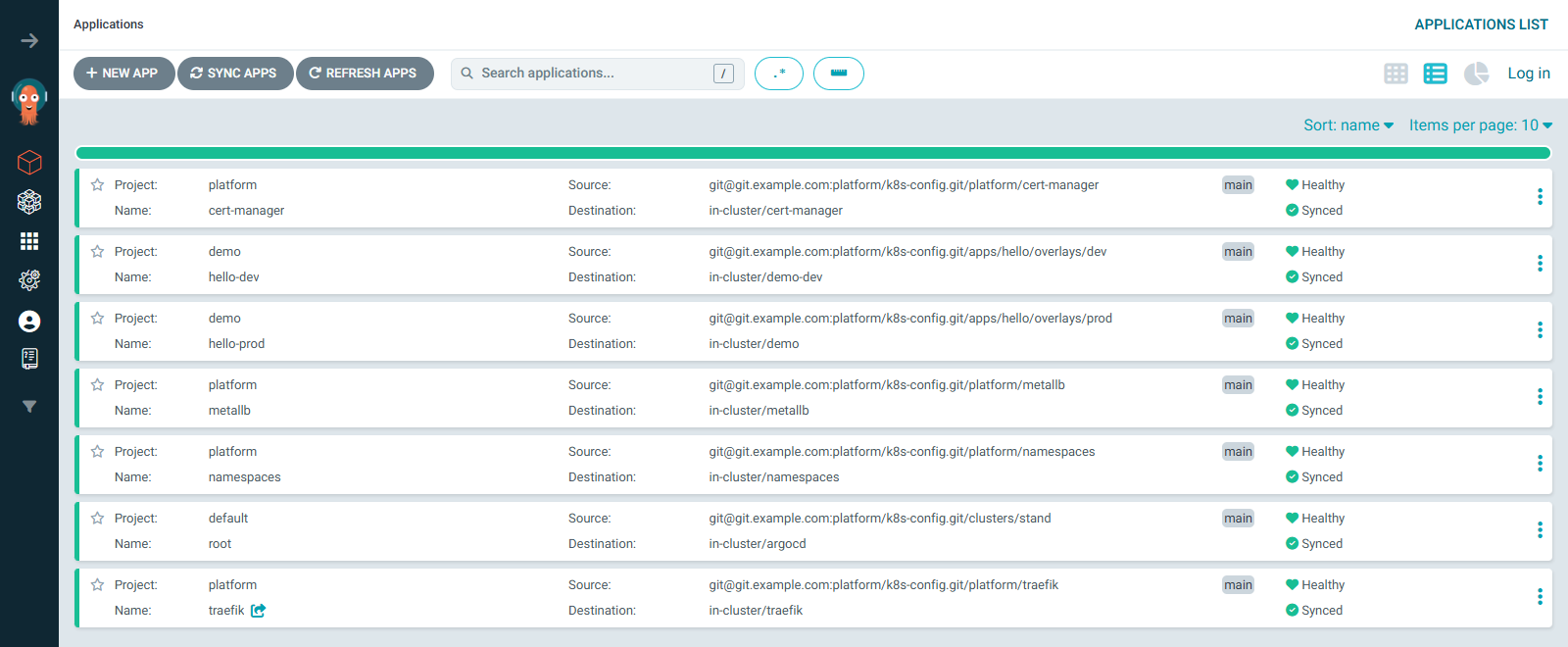
$ kubectl -n argocd get applications,applicationsets,appprojects
NAME                                   SYNC STATUS   HEALTH STATUS
application.argoproj.io/cert-manager   Synced        Healthy
application.argoproj.io/hello-dev      Synced        Healthy
application.argoproj.io/hello-prod     Synced        Healthy
application.argoproj.io/metallb        Synced        Healthy
application.argoproj.io/namespaces     Synced        Healthy
application.argoproj.io/root           Synced        Healthy
application.argoproj.io/traefik        Synced        Healthy

NAME                                  AGE
applicationset.argoproj.io/hello      15m
applicationset.argoproj.io/platform   15m

NAME                              AGE
appproject.argoproj.io/default    18m
appproject.argoproj.io/demo       15m
appproject.argoproj.io/platform   15m
The same list in the web UI:
The tree of one application:
$ argocd app get hello-prod
Name:               argocd/hello-prod
Project:            demo
Server:             https://kubernetes.default.svc
Namespace:          demo
URL:                https://localhost:8080/applications/hello-prod
Source:
- Repo:             git@git.example.com:platform/k8s-config.git
  Target:           main
  Path:             apps/hello/overlays/prod
SyncWindow:         Sync Allowed
Sync Policy:        Automated (Prune)
Sync Status:        Synced to main (fd6e8da)
Health Status:      Healthy

GROUP                      KIND                     NAMESPACE  NAME         STATUS     HEALTH   HOOK      MESSAGE
networking.k8s.io          NetworkPolicy            demo       hello        Synced                        networkpolicy.networking.k8s.io/hello serverside-applied
policy                     PodDisruptionBudget      demo       hello        Synced     Healthy            PodDisruptionBudget has SufficientPods
                           Service                  demo       hello        Synced     Healthy            service/hello serverside-applied
apps                       Deployment               demo       hello        Synced     Healthy            deployment.apps/hello serverside-applied
autoscaling                HorizontalPodAutoscaler  demo       hello        Synced     Healthy            the HPA controller was able to update the target scale to 2
gateway.networking.k8s.io  HTTPRoute                demo       hello        Synced     Healthy            HTTPRoute is healthy
monitoring.coreos.com      ServiceMonitor           demo       hello        Synced                        servicemonitor.monitoring.coreos.com/hello serverside-applied
batch                      Job                      demo       hello-smoke  Succeeded  Synced   PostSync  Reached expected number of succeeded pods
The NetworkPolicy was applied first — wave -1; it and the ServiceMonitor have no health assessment. The MESSAGE column shows the output of the health check for objects that have one, and the result of apply for the rest. The Job row is left over from the PostSync hook: the Job itself was deleted after success (HookSucceeded), and its outcome was kept in the application tree. In the web UI the same tree is easier to read: the application on the left, its objects to the right, and under the Deployment its ReplicaSets and pods, which are not in Git but are spawned by objects from Git:
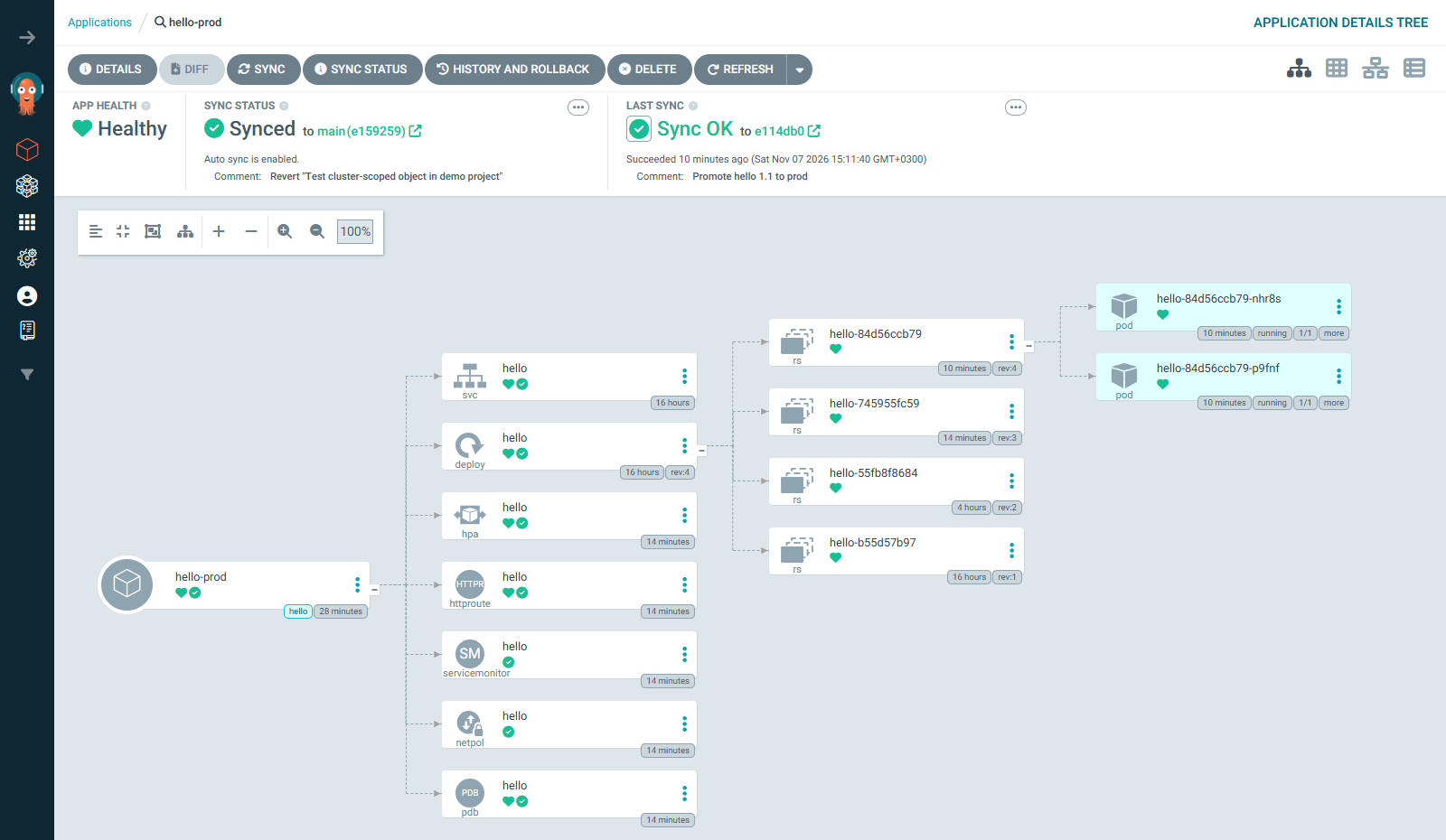
The screenshot was taken after the promotion of version 1.1 described below, so the Deployment has four ReplicaSets: two from manual rollouts in previous parts, one from the first synchronization and one from the new version. The tracking annotation on the object:
$ kubectl -n demo get deployment hello -o jsonpath='{.metadata.annotations.argocd\.argoproj\.io/tracking-id}{"\n"}'
hello-prod:apps/Deployment:demo/hello
Drift. Let's change the image in dev by hand, bypassing Git:
$ kubectl -n demo-dev set image deployment/hello hello=ghcr.io/example/hello:debug
deployment.apps/hello image updated
$ kubectl -n argocd get events --field-selector involvedObject.name=hello-dev \
    --sort-by=.lastTimestamp -o custom-columns=TIME:.lastTimestamp,REASON:.reason,MSG:.message | tail -n 6
2026-11-07T12:09:22Z   OperationStarted     Initiated automated sync to 'fd6e8dad5ec5ce28fa42f2f7052b6c755f12489a'
2026-11-07T12:09:22Z   ResourceUpdated      Updated sync status: Synced -> OutOfSync
2026-11-07T12:09:22Z   ResourceUpdated      Updated health status: Healthy -> Progressing (Caused by apps/Deployment:demo-dev/hello)
2026-11-07T12:09:22Z   OperationCompleted   Partial sync operation to fd6e8dad5ec5ce28fa42f2f7052b6c755f12489a succeeded
2026-11-07T12:09:22Z   ResourceUpdated      Updated sync status: OutOfSync -> Synced
2026-11-07T12:09:22Z   ResourceUpdated      Updated health status: Progressing -> Healthy
$ kubectl -n demo-dev get deployment hello -o jsonpath='{.spec.template.spec.containers[0].image}{"\n"}'
ghcr.io/example/hello:1.1
$ kubectl -n demo-dev get rs
NAME               DESIRED   CURRENT   READY   AGE
hello-6b67c54cc7   0         0         0       15s
hello-76f76bb446   1         1         1       102s
The controller saw the change through watch, marked the application OutOfSync and in the same second returned the image from Git — that is selfHeal. The synchronization is partial (Partial sync operation): Argo CD applied only the diverged Deployment, not the whole application. The Deployment managed to create a ReplicaSet with the debug image, but its pod never got a single ready replica, and the old pod kept running. Without selfHeal the application would have stayed OutOfSync, and the divergence would have been shown by the command argocd app diff hello-dev. Temporarily switching off self-healing for an application generated by an ApplicationSet with the argocd app set command will not work: the ApplicationSet controller returns the settings from the template just as Argo CD returns objects from Git.
A change through Git. We promote version 1.1 to prod: the tag and digest change in overlays/prod/kustomization.yaml. Before committing, it is worth looking at what exactly will change in the cluster — argocd app diff with the --local flag compares a local copy of the repository with the live objects:
$ git diff
diff --git a/apps/hello/overlays/prod/kustomization.yaml b/apps/hello/overlays/prod/kustomization.yaml
index 17f7d80..b392130 100644
--- a/apps/hello/overlays/prod/kustomization.yaml
+++ b/apps/hello/overlays/prod/kustomization.yaml
@@ -8,5 +8,5 @@ resources:
 - smoke-test.yaml
 images:
 - name: ghcr.io/example/hello
-  newTag: "1.0"
-  digest: sha256:a5066cd40ef37b9b889ddfbe9c1860b3afe231b96b975000e0edca3fdd6f4a4a
+  newTag: "1.1"
+  digest: sha256:2d8774f801594f2b1b115963e54ec54b1b49f95c2dece1d6b0fd1e59ab447c7b
$ argocd app diff hello-prod --local "$PWD" --server-side-generate

===== apps/Deployment demo/hello ======
32c32
<       - image: ghcr.io/example/hello:1.0@sha256:a5066cd40ef37b9b889ddfbe9c1860b3afe231b96b975000e0edca3fdd6f4a4a
---
>       - image: ghcr.io/example/hello:1.1@sha256:2d8774f801594f2b1b115963e54ec54b1b49f95c2dece1d6b0fd1e59ab447c7b
$ echo $?
1
On the left (<) is what is in the cluster now, on the right (>) what will be there after synchronization. Nothing extra: only the image changes. Exit code 1 means "there is a difference", 0 means "it matches", so the command can be put into the merge request checks. The two flags here are not accidental. With --server-side-generate the CLI sends the files to repo-server, and they are rendered by the same Kustomize with the same kustomize.buildOptions as during synchronization; without this flag the CLI says that local rendering is deprecated and fails if the machine has no separate kustomize binary. And --local here is the root of the repository, as an absolute path at that: the CLI appends the path apps/hello/overlays/prod from the application settings, and rejects a relative path with the error full path does not contain base path.
Commit, review, merge into main — and Argo CD delivers. But argocd app wait right after the push waits for nothing:
$ git commit -am 'Promote hello 1.1 to prod' && git push
$ argocd app wait hello-prod --sync --health --timeout 300
...
Sync Status:        Synced to main (fd6e8da)
Health Status:      Healthy
The command returned instantly: the application really is Synced and Healthy — to the old commit fd6e8da. Without a webhook Argo CD learns about the push at the next Git poll (up to three minutes), and until then it has nothing to wait for. So you either wait until the new commit appears in status.sync.revision, or ask it to reread Git right away with the command argocd app get hello-prod --refresh and then wait. In the lab the poll came at a lucky moment, 46 seconds after the push:
$ kubectl -n argocd get events --field-selector involvedObject.name=hello-prod \
    --sort-by=.lastTimestamp -o custom-columns=TIME:.lastTimestamp,REASON:.reason,MSG:.message | tail -n 7
2026-11-07T12:11:28Z   OperationStarted     Initiated automated sync to 'e114db0f235e327ab5e65cf2ba7340f5ddfa103f'
2026-11-07T12:11:28Z   ResourceUpdated      Updated sync status: Synced -> OutOfSync
2026-11-07T12:11:31Z   ResourceUpdated      Updated sync status: OutOfSync -> Synced
2026-11-07T12:11:31Z   ResourceUpdated      Updated health status: Healthy -> Progressing (Caused by apps/Deployment:demo/hello)
2026-11-07T12:11:33Z   ResourceUpdated      Updated health status: Progressing -> Healthy
2026-11-07T12:11:40Z   ResourceUpdated      Updated health status: Healthy -> Degraded (Caused by autoscaling/HorizontalPodAutoscaler:demo/hello)
2026-11-07T12:11:40Z   OperationCompleted   Sync operation to e114db0f235e327ab5e65cf2ba7340f5ddfa103f succeeded
$ argocd app history hello-prod
SOURCE  git@git.example.com:platform/k8s-config.git
ID      DATE                           REVISION
0       2026-11-07 12:08:05 +0000 UTC  main (fd6e8da)
1       2026-11-07 12:11:40 +0000 UTC  main (e114db0)
Between Progressing -> Healthy and the end of the operation are the seven seconds of the hello-smoke PostSync hook. The Degraded from the HPA is those very moments without metrics for the new pods; 30 seconds later the application is Healthy again. The new version answers through Traefik:
$ curl -s https://hello.apps.example.com/ -D - -o /dev/null | grep -iE '^HTTP|x-app'
HTTP/2 200
x-app-version: 1.1
A rollback also goes through Git: git revert of the commit and a push. The argocd app rollback command exists, but it is forbidden while automated synchronization is enabled: Argo CD would immediately return the state from Git, and a rollback bypassing Git would be exactly that drift.
$ argocd app rollback hello-prod 0
{"level":"fatal","msg":"rpc error: code = FailedPrecondition desc = rollback cannot be initiated when auto-sync is enabled","time":"2026-11-07T12:11:58Z"}
A bad commit and retry. retry has a flip side. The ClusterRole from the section on projects got into main, the synchronization of hello-dev started failing, and it was reverted with git revert. The application became Synced to the new commit, but the sync operation of the old, failed commit kept being repeated by retry — until limit: 5 is exhausted that is almost eight minutes with pauses of 10, 20, 40, 80 and 160 seconds, and while it is running, a new synchronization will not start. Such an operation is interrupted by hand:
$ argocd app terminate-op hello-dev
Application 'hello-dev' operation terminating
$ kubectl -n argocd get app hello-dev -o jsonpath='{.status.operationState.message}{"\n"}'
Operation terminated (retried 5 times).
Flux
The second widespread GitOps tool is Flux, also a CNCF project. The idea is the same — a pull agent, continuous reconciliation — but the design is different. Flux is a set of independent controllers, each with its own CRDs: source-controller fetches sources (GitRepository, HelmRepository, OCIRepository), kustomize-controller applies directories (Kustomization is a Flux object, not to be confused with a Kustomize file, although inside it does call Kustomize), helm-controller installs charts as real Helm releases (HelmRelease, visible in helm list), notification-controller sends notifications and receives webhooks. The base installation has no web UI of its own: the state is viewed with the flux CLI and kubectl, and a web UI is offered by Flux Operator, a separate operator that installs and upgrades Flux itself. Flux decrypts SOPS by itself, without plugins. Argo CD was chosen for this series for its clear application tree, ApplicationSet and projects with their own RBAC; Flux fits into a cluster more easily as "a few more controllers" and is closer to native Kubernetes mechanisms. Both are solid tools, and the choice is usually determined by whether the team needs a UI and multi-user access to delivery.
Series wrap-up
This part is the last main one. The series started with the reconciliation loop: a controller compares the desired state with the actual one and eliminates the difference. Then we built a cluster on kubeadm where this loop runs in every component: workloads, networking, storage, manifest packaging, security, observability and maintenance of the cluster itself, and then added Windows nodes to it. GitOps closes the circle: the same reconciliation loop, only the desired state now lives in Git rather than in the heads and terminals of administrators. Everything installed by hand over 40 parts becomes a directory in a repository that can be read, checked in review and deployed again on an empty cluster.
Where to go next:
- A highly available control plane. The series lab lives on a single master, and in parts 34 and 35 this more than once turned into API downtime. Three masters with etcd on each, a shared API address through kube-vip and Calico over BGP are covered in the series "Highly available Kubernetes on BGP".
- A service mesh — a layer of proxies next to every pod or on every node that provides mutual TLS authentication between services, retries, traffic splitting between versions and per-request metrics without changes to the application.
- Kyverno policies — an admission controller in which rules like "images only from
ghcr.io/example/", "every Deployment has requests and limits" or "add the team label" are described as Kubernetes objects and kept in the same configuration repository. - Multicluster — several clusters (per environment, site, team) managed by one Argo CD through the cluster generator in an ApplicationSet, with the clusters themselves created declaratively, for example through Cluster API, a set of controllers that describe clusters and their machines as Kubernetes objects.
Thank you for going through the series to the end.
Sources
- GitOps: OpenGitOps principles.
- Argo CD: architecture, installation, declarative setup, private repositories, Kustomize, sync waves and hooks, App of Apps, ApplicationSet, projects, RBAC, secret management.
- GitHub: deploy keys.
- Secrets: Sealed Secrets, SOPS, KSOPS, External Secrets Operator.
- Flux: components.
Next — a bonus part: kind, k3s and minikube — clusters on a single machine, how they differ from a kubeadm cluster and when each of them is appropriate.
Only registered users can leave a comment.
Sign in or register to leave a comment.