CustomControls vs. UserControls in WPF
WPF offers 2 approaches to building your own controls: CustomControls and UserControls. In this article I'll try to list the characteristics of each approach to help you make the right choice for your project.
UserControl - composition
- Combines existing controls into a group to make them easier to reuse.
- Consists of XAML and C# code.
- Its appearance can't be changed with styles and templates.
- Derives from UserControl
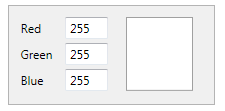
This is an example of an RGB control that displays a color. The XAML combines 3 text boxes and a field that shows the color. All of the control's logic lives in the CS file.
CustomControl - extending existing controls
- Extends the functionality of existing controls.
- Consists of a code file and a default style defined in Themes/Generic.xaml.
- Can be styled in any way you like.
- The recommended approach for building a component library.

An example of a control (for picking a number) with up/down buttons. It extends a regular text box. Its appearance can easily be changed if, say, you need the buttons on the left.
Only registered users can leave a comment.
Sign in or register to leave a comment.