Protecting an ASP.NET Core application from CSRF attacks
In this post I want to explain what a CSRF (Cross-Site Request Forgery) attack is and how to protect against it.
Act 1
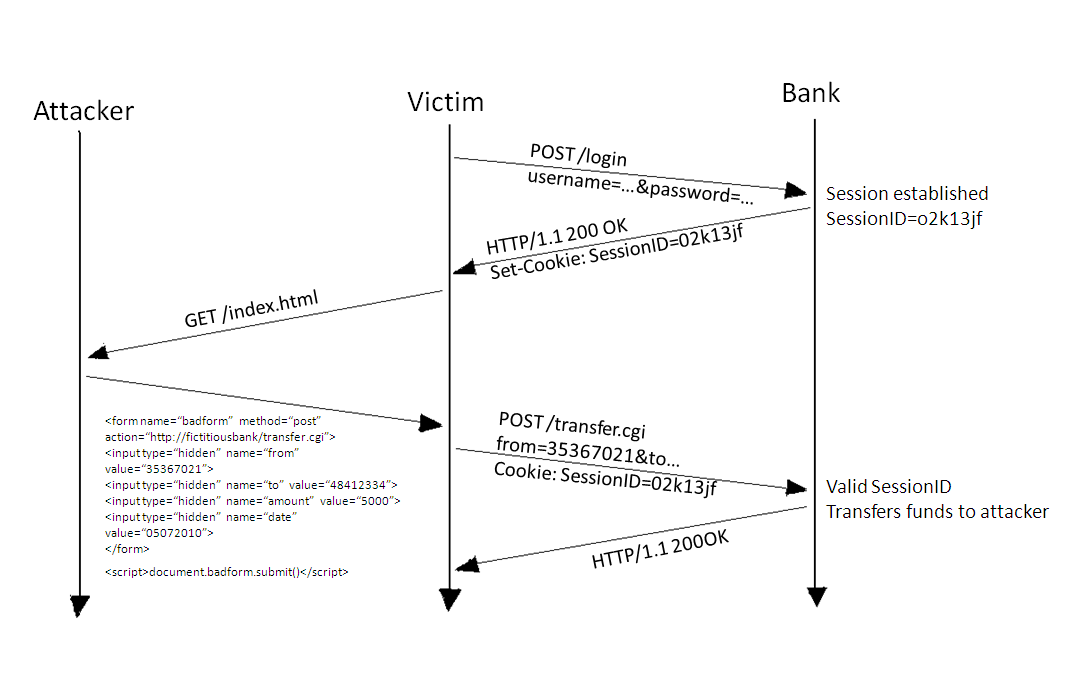
Imagine the online banking site of some fictional bank. A customer of this bank logs in to the site in a perfectly legitimate way, performs a few operations and closes the page without logging out. After that, a cookie remains in the customer's browser.
The customer is then tricked into visiting a fraudsters' site, which sends an AJAX request to the online banking site asking to transfer some amount of money to the fraudsters' account. Since the browser still holds the cookie from the online banking site, it kindly attaches it to the fraudsters' request. That's it.
Act 2
Now let's try to understand what happened.
Since the request goes to a different domain, and we are not considering an XSS injection on the online banking site, the browser by default (unless CORS is configured) will not let the page read the response from the server. But our fraudsters don't really need it. What matters is that the request itself was sent to the server and processed. In other words, the money was debited. The attack can be considered successful.
Act 3
Let's move on to protection.
To protect against this attack, two AntiForgery tokens are used. One is sent to the client as a cookie, the other in a hidden field of the form. When the client makes a request on the online banking site themselves, both tokens go to the server: one in the form or in a header, the other in the cookie. The server checks that they are valid and, if something is wrong, returns a response with status 400.
First, let's change the Startup class
public class Startup
{
	public void ConfigureServices(IServiceCollection services)
	{
		// ...
		services.AddMvc(options =>
		{
			options.Filters.Add(new AutoValidateAntiforgeryTokenAttribute());
		});
	}
}
By default, ASP.NET MVC adds a hidden field like this to every form:
<input name="__RequestVerificationToken" type="hidden" value="CfEJ6IxjsTbAPh1AhIp.........5PEbMY4s-2ALCzGETVQe6VixWhh3WMMXzVSXJ3w">
and creates a cookie with a name like .AspNetCore.Antiforgery.leVP-PGSx2U
That is enough to protect forms created by ASP.NET MVC Core. But what about AJAX requests?
It's simple. Add this piece of code to the _Layout.cshtml file:
@inject Microsoft.AspNetCore.Antiforgery.IAntiforgery Xsrf
@functions{
    public string GetAntiXsrfRequestToken()
    {
        return Xsrf.GetAndStoreTokens(Context).RequestToken;
    }
}
<meta name="requests-validation-token" content="@GetAntiXsrfRequestToken()" />
Now let's modify the script that sends the request to the server:
function getRequestsValidationToken(): string {
    const key = "requests-validation-token";
    const elements = document.getElementsByTagName("meta");
    for (let i = 0; i < elements.length; i++) {
        const element = elements.item(i);
        if (element.name == key) {
            return element.content;
        }
    }
    return null;
}

const token = getRequestsValidationToken();
if (token == null) {
    throw new Error("Can't read requests validation token");
}

$.ajax({
    type: 'POST',
    url: url,
    headers: {
        "RequestVerificationToken": token,
    }
    //OR
    //beforeSend: function(xhr) {
    //  xhr.setRequestHeader("RequestVerificationToken", token);
    //}
}).done(function(data) {
    alert(data);
});
An attentive reader may ask: if the token itself is in the body of the page, what stops attackers from making a GET request for our page and reading the token? They can try, but the browser will say: Failed to load https://www.vitaliy.org/: No 'Access-Control-Allow-Origin' header is present on the requested resource. Origin 'https://hacker-site.com' is therefore not allowed access.
If the site runs on several servers (in a farm or in Docker), you need to configure DataProtection so that one server can decrypt a token created by another. In my case this is done by sharing the encryption key in Redis.
using Microsoft.AspNetCore.DataProtection;

public void ConfigureServices(IServiceCollection services)
{
	var redis = ConnectionMultiplexer.Connect(Configuration.GetConnectionString("RedisConnection"));
	services.AddDataProtection().PersistKeysToRedis(redis, Configuration["Services:Redis:Key"]);
}
PS: what else needs to be done? Configure a Content-Security-Policy and fight XSS. But that's another story...
Only registered users can leave a comment.
Sign in or register to leave a comment.