Managing Azure DNS Almost Without PowerShell
Fairly recently, Microsoft Azure gained the ability to manage DNS zones. While the service is in Preview, the only way to manage it is with PowerShell.
To get the cmdlets you need, you have to install Microsoft Azure PowerShell. I won't argue that PowerShell is cool. It is, but sometimes you'd rather do without it.
So I present to the public my own reinvented wheel: a tool for managing Azure DNS. 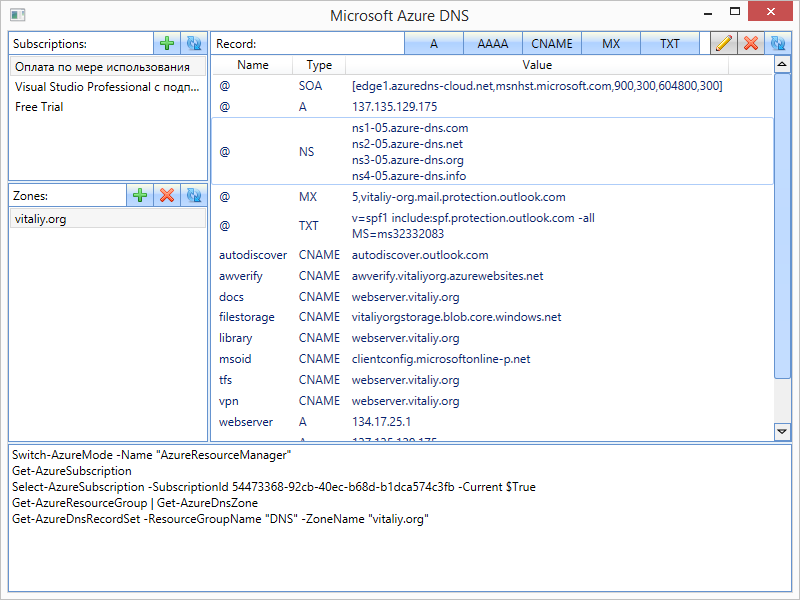
Why did I say "almost" in the title? Because you still need Azure PowerShell for it to work. The tool writes every command it runs to a log, but you don't have to write them yourself. Given that the commands can be quite verbose, typing them by hand is tedious. And it was precisely my laziness about doing that which prompted me to write this tool.
What can the tool do?
- manage zones
- manage A, AAAA, CNAME, MX and TXT records
How does it work?
- Add your account with an Azure subscription.
- Select a subscription.
- Create a zone in one of the resource groups.
- Create records in the zone.
- ...
- profit!
PS: To activate the DNS service for your subscription, you still have to dive into PowerShell once and cast this spell:
Switch-AzureMode -Name AzureResourceManager
Add-AzureAccount
Get-AzureSubscription
Select-AzureSubscription -SubscriptionName "your subscription name"
Register-AzureProvider -ProviderNamespace Microsoft.Network -Force
Register-AzureProviderFeature -ProviderNamespace Microsoft.Network -FeatureName azurednspreview -Force
Get-AzureProviderFeature -ProviderNamespace Microsoft.Network -FeatureName azurednspreview
PPS: You can browse the source code here. You can install and try it here. You'll need to install Microsoft Azure PowerShell first.
Only registered users can leave a comment.
Sign in or register to leave a comment.